
Watching a Quote Build
A quote built from documents stays closed until the whole process has finished. While it runs you get a page that says what it is doing, and this article explains what that page reports, what it means when a build goes quiet, and which button does what if one stops.
Why the Quote Is Held
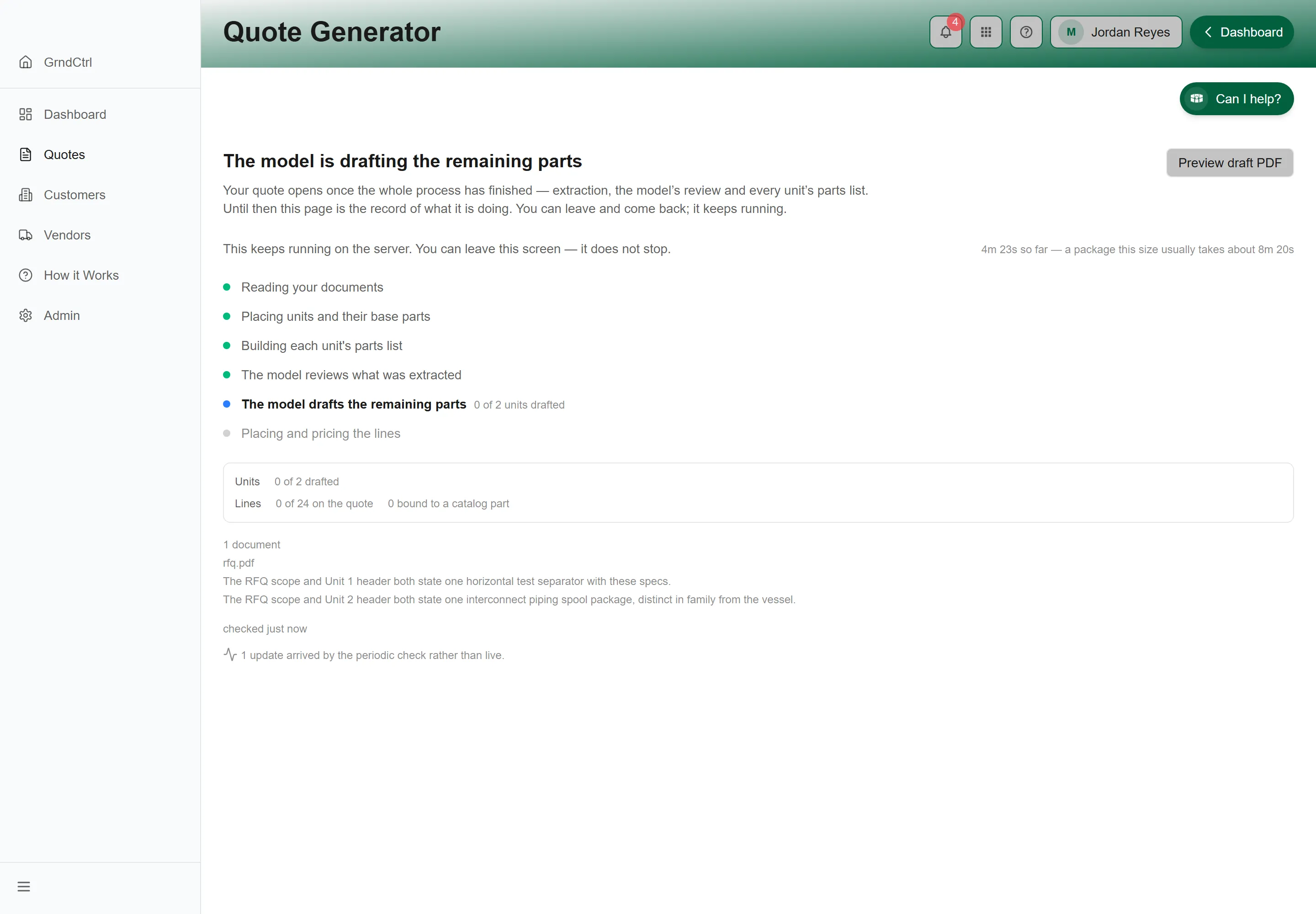
Section titled “Why the Quote Is Held”The page states the rule at the top: “Your quote opens once the whole process has finished”. Extraction, the model’s review, and every unit’s parts list. Until then, this page is the record of what the build is doing.
The work does not depend on you watching it. The page says so: “This keeps running on the server. You can leave this screen”. Close the tab, go to another quote, come back later. Nothing stops.
What It Reports
Section titled “What It Reports”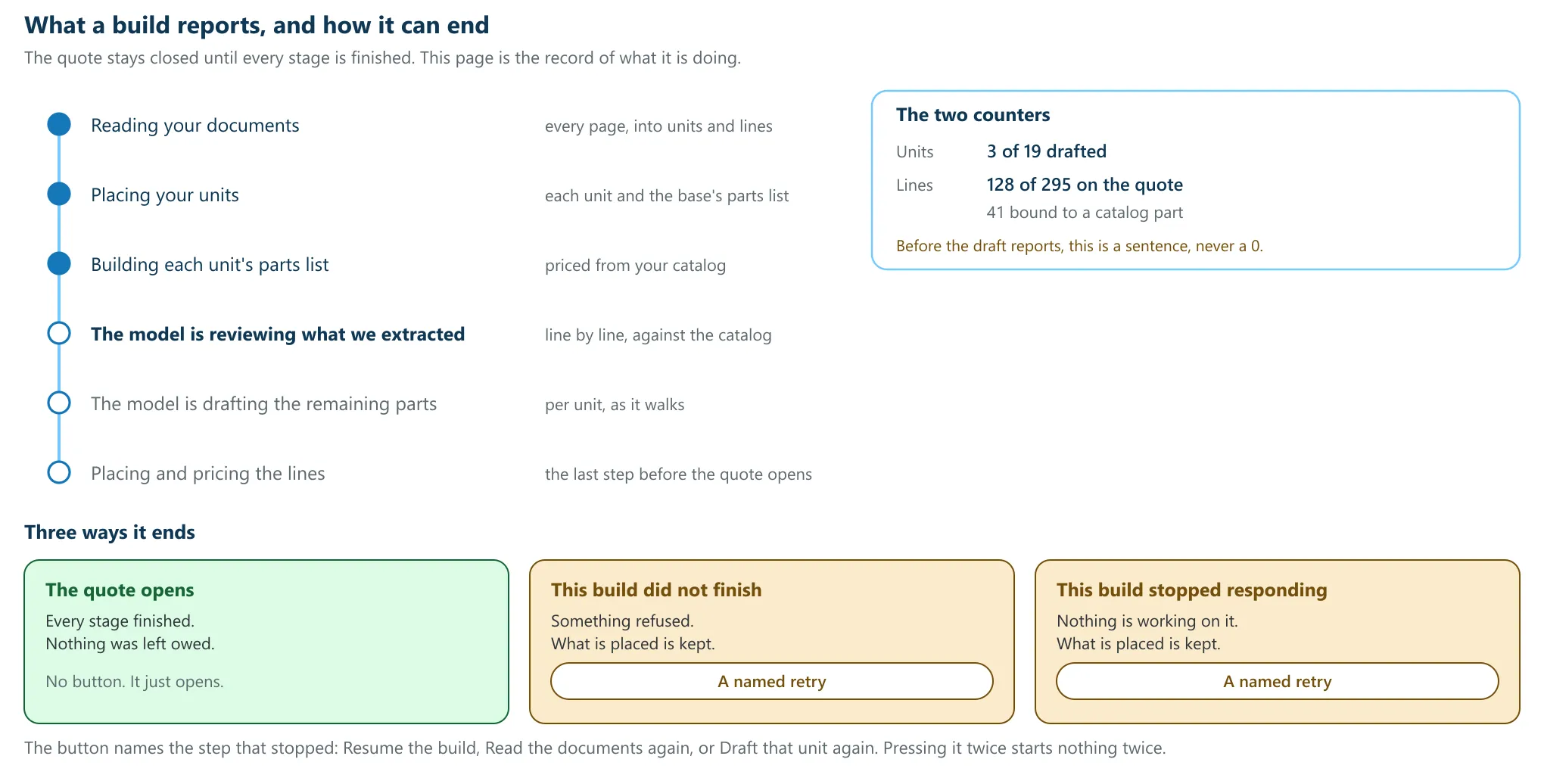
The stages
Section titled “The stages”The stages come from the server in the order they run, each with its own state, so the list is what is actually happening rather than a fixed picture of what usually happens. The headline names the stage the build is in now.
- “Reading your documents”: every page, into units and lines.
- “Placing your units”: each unit, and the base’s parts list if you picked one.
- “Building each unit’s parts list”: priced from your catalog.
- “The model is reviewing what we extracted”: line by line, against the catalog.
- “The model is drafting the remaining parts”: per unit, as it walks.
- “Placing and pricing the lines”: the last step before the quote opens.
The two counters
Section titled “The two counters”Units counts units drafted against units extracted. Lines counts lines on the quote against lines extracted, and says how many of them are bound to a catalog part. Both move as the drafter finishes each unit, so a long drafting stage reports progress the whole way through instead of jumping at the end.
Before the parts-list draft has started there is nothing to count, and the panel says so in words rather than counting to zero: “The parts-list draft has not reported yet”. On a finished quote that never drafted it reads “No parts-list draft has run on this quote.” The extraction’s own counts, a different fact with a different writer, are still shown either way.
Elapsed, and how long it usually takes
Section titled “Elapsed, and how long it usually takes”The page prints how long this build has been running and, once it knows how big the package is, how long a package this size normally takes. It does not print a countdown, and that absence is deliberate: units on one package can take ten seconds or two and a half minutes, so a seconds-remaining figure would be invented rather than measured.
The per-unit timeline
Section titled “The per-unit timeline”The drafter writes one row per unit as it finishes, and a row that is not ordinary progress is labelled: “skipped”, “problem” or “stalled”. An ordinary row carries no label, so the two that matter stay visible.
Previewing the Document While It Builds
Section titled “Previewing the Document While It Builds”Preview draft PDF works at any point during the build, and it opens the same document the finished quote would. You can check the letterhead, the cover letter and what has landed so far without waiting.
When a Build Goes Quiet
Section titled “When a Build Goes Quiet”If nothing has been reported for a while the page says so beside the clock, and the progress bar dims. That is not a death notice. Quiet means exactly what it says: the build started that long ago, and nothing has been heard recently. A build that is genuinely dead is converted to one of the two stopped states below, and the page changes with it.
You may also see a note that updates arrived by the periodic check rather than live. That is the fallback reporting that it fired: the page is still correct, the live channel is not.
What Waiting Means Here
Section titled “What Waiting Means Here”A stage that is waiting is waiting on the step in front of it and nothing else. Each stage starts as soon as the one before it finishes: the model’s review hands straight to the parts-list draft, and the draft hands straight to pricing. There is no queue to clear and no interval to sit out.
So a build that is not moving is either genuinely working, which the per-unit timeline shows, or it has stopped, which the page says outright. It is never quietly serving a waiting period.
The Three Ways It Ends
Section titled “The Three Ways It Ends”| What you see | What it means | What to do |
|---|---|---|
| The quote opens | Every stage finished and nothing was left owed. | Nothing. It opens by itself. |
| “This build did not finish” | “The build stopped before it finished.” Something refused, and the page names the stage it was at. | Press the retry button. |
| “This build stopped responding” | “Nothing is working on this quote any more.” No worker is on it. | Press the retry button. |
In both stopped states the page says the same thing about your data: “Everything already placed on the quote is kept. Retrying picks up where it stopped”. A retry is not a rebuild, and it does not start the quote again.
Which retry you get
Section titled “Which retry you get”There is no single retry button, because there is no single thing that stops. The button names the step: Resume the build, Read the documents again, or Draft that unit again. Which one you see is chosen from what failed.
Pressing it twice is safe. A second press sends the same request, and the page tells you so: “That retry is already running”. Nothing is started twice.
After the Quote Opens
Section titled “After the Quote Opens”The same report is available from the open quote, so you can look back at a build that has finished. It carries the job’s own id at the foot, which is the thing to quote to support if you ever need someone to find the run.
Troubleshooting
Section titled “Troubleshooting”The page says it cannot tell whether the quote is ready
Section titled “The page says it cannot tell whether the quote is ready”The status could not be read. That is neither ready nor held, and the page will not guess. Use Try again, or Open the quote anyway if you need to get in; a quote is not blocked because a status check failed.
A counter is not moving
Section titled “A counter is not moving”Each counter moves when its own stage reports. During a stage the counter for a later stage has nothing to say yet. Check which stage the headline names before reading a still number as a stall.
The build finished but some units have no parts list
Section titled “The build finished but some units have no parts list”The page says so in plain words, and it says that nothing will retry them. That is a finished build with a known gap, not a build still running. Add the missing parts by hand, or draft that unit again.
It says the draft was picked back up automatically
Section titled “It says the draft was picked back up automatically”A build whose worker stopped is put back to work without anyone asking. The line exists so a repair nobody requested is not invisible; the quote is fine.
A build is taking much longer than usual
Section titled “A build is taking much longer than usual”Compare the elapsed figure against the typical figure the page prints for a package that size. A long package genuinely takes longer, and the number of units, not the number of documents, is what drives it.
Could a build just be lost?
Section titled “Could a build just be lost?”A piece of work that is queued and never picked up is detected within about a minute and reported as a stopped build, with the retry that fits it. A message that fails delivery outright is set aside and raises an alarm with the platform team. A lost job is something somebody is told about, not something you find by waiting.