
How Quote Generator Is Configured
Quote Generator’s settings come in layers: a floor every tenant shares, the shape of your kind of business, your company’s own configuration, and the changes your administrators make in Admin. This article explains the layers, how a value is worked out from them, and which settings you change in Admin and which NXTC applies for you.
The Layers
Section titled “The Layers”Every tenant’s configuration is put together from three layers, in this order. Your administrators’ changes are kept separately and sit on top.
| Layer | What it holds | Who writes it |
|---|---|---|
| Base | The arithmetic every tenant shares: the line, unit and quote formulas, the model’s default confidence threshold and preset seeding floor, and the default pricing direction. Nothing about any one business. | NXTC, for every tenant at once |
| Archetype | The shape of a kind of business: what one quoted unit is, its line types and default quote sections, which way money flows, and the reading instructions the model follows on your documents. | NXTC |
| Tenant | Your company’s own configuration: families and their specifications, margin tiers, labor departments, formulas and constants of your own, presets, and the optional parts of the app your quotes use. | NXTC, from what you tell us |
| Your changes | What an administrator changes in Admin: an edited row, a row created there, a row disabled. | Your administrators |
The three archetypes
Section titled “The three archetypes”Your tenant is built on exactly one archetype. It is chosen when NXTC sets you up, and it is not changed in Admin.
- Parts-and-labor products: a quoted unit is equipment you build, priced from the cost of its parts and labor.
- Catalog-priced services: a quoted unit is a service at the price your catalog states, with no parts or labor lines under it.
- Distance-rated movements: a quoted unit is one load, priced by a rate over a distance worked out from the pieces it carries.
A quote type on top: cut from stock
Section titled “A quote type on top: cut from stock”Separately from the archetype, a tenant can declare a quote type that adds screens of its own. Today there is one, cut from stock, for shops that cut pieces from purchased stock lengths. It is a single declared setting, and every screen it adds is absent on a tenant that does not declare it. The two words are easy to confuse: the archetype is the shape of the business, and the quote type is extra machinery on top of it.
To demonstrate a new line of business, NXTC can load a pack: one named bundle of an archetype, a tenant layer, the few records a quote cannot exist without, and the documents that exercise them. Loading a pack replaces the tenant’s configuration rather than adding to it. A pack does not create the tenant, install the app or add users.
How a Value Is Worked Out
Section titled “How a Value Is Worked Out”How the layers combine depends on the kind of setting.
| Kind of setting | How the layers combine |
|---|---|
| Lists: families, specifications, line types, categories, margin tiers, allowances, labor departments, kits, presets | Every layer’s entries are added together. A layer adds entries; it cannot take one away by leaving it out. |
| Formulas | A later layer may add formulas but never replace one. The base and archetype formulas are a floor, and a configuration that reuses one of their ids is refused before anything is written. |
| Single policies: the pricing policy, the optional parts of the app, contingency, the model’s confidence and seeding settings, what a new quote starts with | The last layer that declares the policy wins, whole. A tenant layer that declares one replaces the archetype’s entirely, so it restates anything it means to keep. |
| Prompt blocks, the reading instructions | Each layer’s text for a block is joined on, base first. An administrator’s edit replaces the whole block, and a reset returns the joined text. |
Where nothing declares a value, Quote Generator reads a safe floor rather than guessing: prices are worked out from cost, a new quote starts on the default margin tier, a new quote is valid for 30 days, no model files are read, and no cut-from-stock screen appears.
Your Changes Sit on Top
Section titled “Your Changes Sit on Top”An administrator’s change in Admin is stored beside the configuration, never inside it. That is what lets NXTC apply an updated configuration without undoing your work.
- A row you edited shows modified, and each field you changed shows the value it replaced, so you can put it back.
- A row you created in Admin is yours: it has no default behind it.
- A row that came from the configuration can be disabled but not deleted. A disabled row stays out of the engine until you restore it.
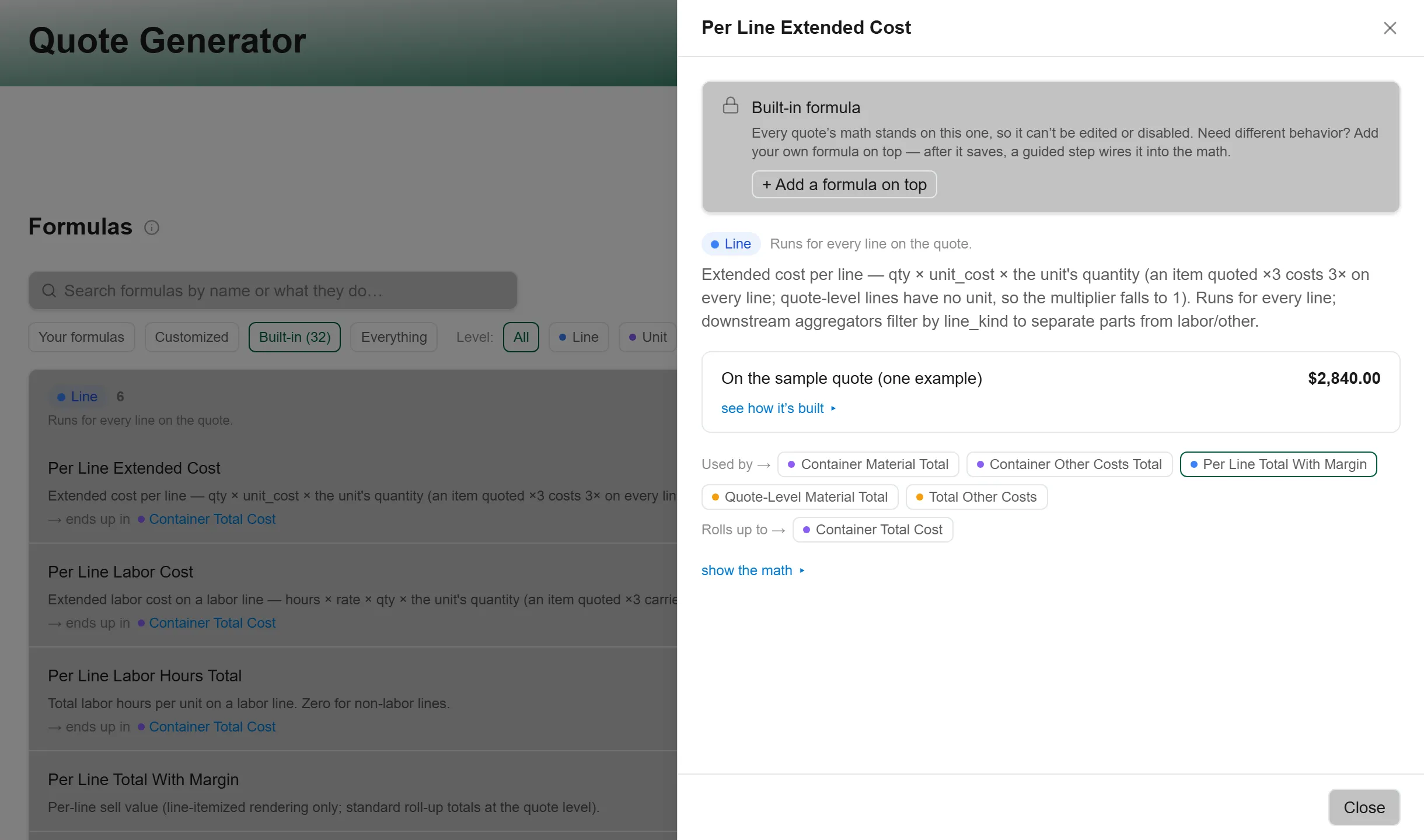
- A built-in formula, one from the base or the archetype, opens locked as Built-in formula. You can add a formula of your own with + Add a formula on top. On Pricing → Formulas, the filters Your formulas, Customized, Built-in and Everything separate them.
When NXTC applies an updated configuration, every change of yours is laid back over it. Three things can then need you, and the Admin page says so above its boxes, under Configuration health:
- orphaned: “Your customization’s underlying default was renamed or removed by a config update.” Re-attach it to the renamed row, or Discard it.
- conflict: “A config update introduced a default with the same identity as something you created. Yours stays in effect until you decide.” Choose Keep mine as a customization or Adopt the default.
- quarantined: “Your customization no longer passes validation against the updated config — the shipped default is in effect.” Choose Ratify the default (drop my change), or rework it in its editor.
Click Review beside the count to open them. When nothing needs you, the same strip counts your customizations instead; click the count to see What you’ve customized, with Open beside each row.
What You Change and What NXTC Applies
Section titled “What You Change and What NXTC Applies”Each row says where a setting lives in the configuration and where you see it. A page whose rows all come from the base or the archetype shows them read-only, with a note saying they are not edited there. A page your tenant’s shape can never use is not drawn at all.
| Setting | Configuration key | Where you see it | Who changes it |
|---|---|---|---|
| Families and their specifications | product_families, specifications |
Products; specifications open inside each family | Administrator |
| Line types and categories | line_types, catalog_categories |
Catalog → Line types, Categories | Administrator |
| Kits and presets | kits, product_presets |
Catalog → Kits; presets inside each family | Administrator. Every edit makes a new version. |
| Labor departments | labor_departments |
Labor | Administrator |
| Margin tiers | margin_tiers |
Pricing → Margin Tiers | Administrator |
| Allowances and contingency | allowance_buckets, contingency |
Pricing → Allowances, Contingency | Administrator |
| Formulas and constants | formula_slots, settings_constants |
Pricing → Formulas, Settings & Constants | Administrator, for formulas of your own; built-in formulas are locked |
| Quote sections | quote_sections |
Presentation | Administrator |
| The model’s confidence threshold, tie margin and preset seeding floor | reconcile_policy, intake_policy |
Operations → Prompt Management, under Knobs | Administrator |
| Prompt blocks | prompt_blocks |
Operations → Prompt Management, under Prompt blocks | Administrator |
| The pricing policy | pricing_policy |
On your quotes; see The pricing policy | NXTC, except the price rounding on a cut-from-stock tenant |
| The optional parts of the app | capabilities |
Whether a screen or menu entry appears at all | NXTC |
| What a new quote starts with: bid validity, delivery weeks, payment terms | quote_defaults |
On each new quote, which can then be changed | NXTC |
| How documents are read: the extraction schemas | extraction_schemas |
What an uploaded document produces | NXTC |
The setting-by-setting levers, what each ships as and what to watch after moving one, are in Tuning Quote Generator.
The pricing policy
Section titled “The pricing policy”One policy decides how money moves on every quote. It is declared in the configuration
and, with one exception, is not edited in Admin: on a tenant with the cut-from-stock
quote type, Pricing → Price rounding sets price_each_round_up_to. Its keys:
direction:derivedworks cost up to a quote total and shares the total back across the units;giventakes each unit’s price as entered and adds them up. Absent, it readsderived.contingency,margin,delivery_aro: each is on unless the policy saysfalse. Off, the quote no longer shows the contingency row, the margin control or the delivery (ARO) line, and the Contingency or Margin Tiers page says it does not apply.recurrence: whether you sell subscriptions. Off unless declared; on, a quote offers a term and a go-live date.tier_default: on unless declaredfalse. Off, no margin tier is the default, a new quote starts with none, its total stays blank with “Pick a markup tier to price this quote.”, and sending is refused with “Pick a markup before sending this quote.” until one is picked.tier_basis:margin, the floor, prices as cost ÷ (1 − margin);markupprices as cost × (1 + markup).price_each_round_up_to: when declared, each unit’s price each is rounded up to the next multiple of this amount, and the difference shows as its own rounding figure rather than being folded in. A quote with declined options is left unrounded.
Troubleshooting
Section titled “Troubleshooting”A page shows its rows but will not let me edit them
Section titled “A page shows its rows but will not let me edit them”Every row on it comes from the base or your archetype, and the note above the rows says so. You can add rows of your own where the page offers it, such as a formula on top of a built-in one. To change a declared row itself, contact support.
A page or setting in this article is not in my Admin
Section titled “A page or setting in this article is not in my Admin”Your tenant’s shape can never use it, so it is not drawn. A catalog-priced services tenant has no Line types, presets, allowances or generic costs, for example. See your archetype’s article.
My change seems to have gone after an update
Section titled “My change seems to have gone after an update”Look for Configuration health on the Admin page. A change that no longer fits the updated configuration is held there as orphaned, in conflict, or quarantined, and the row says which value is in effect until you decide.
I want to change a setting that NXTC applies
Section titled “I want to change a setting that NXTC applies”Contact support with the setting’s name from the table above and the value you want. The change is made in your tenant layer and applied, and your own changes in Admin are kept.