
Administering Service Hub
This article is for administrators of Service Hub — building the catalog people request from, the groups requests route to, and the forms they fill in. For raising and working requests, see Getting Help with Service Hub and Working the Queue in Service Hub.
The Settings Hub
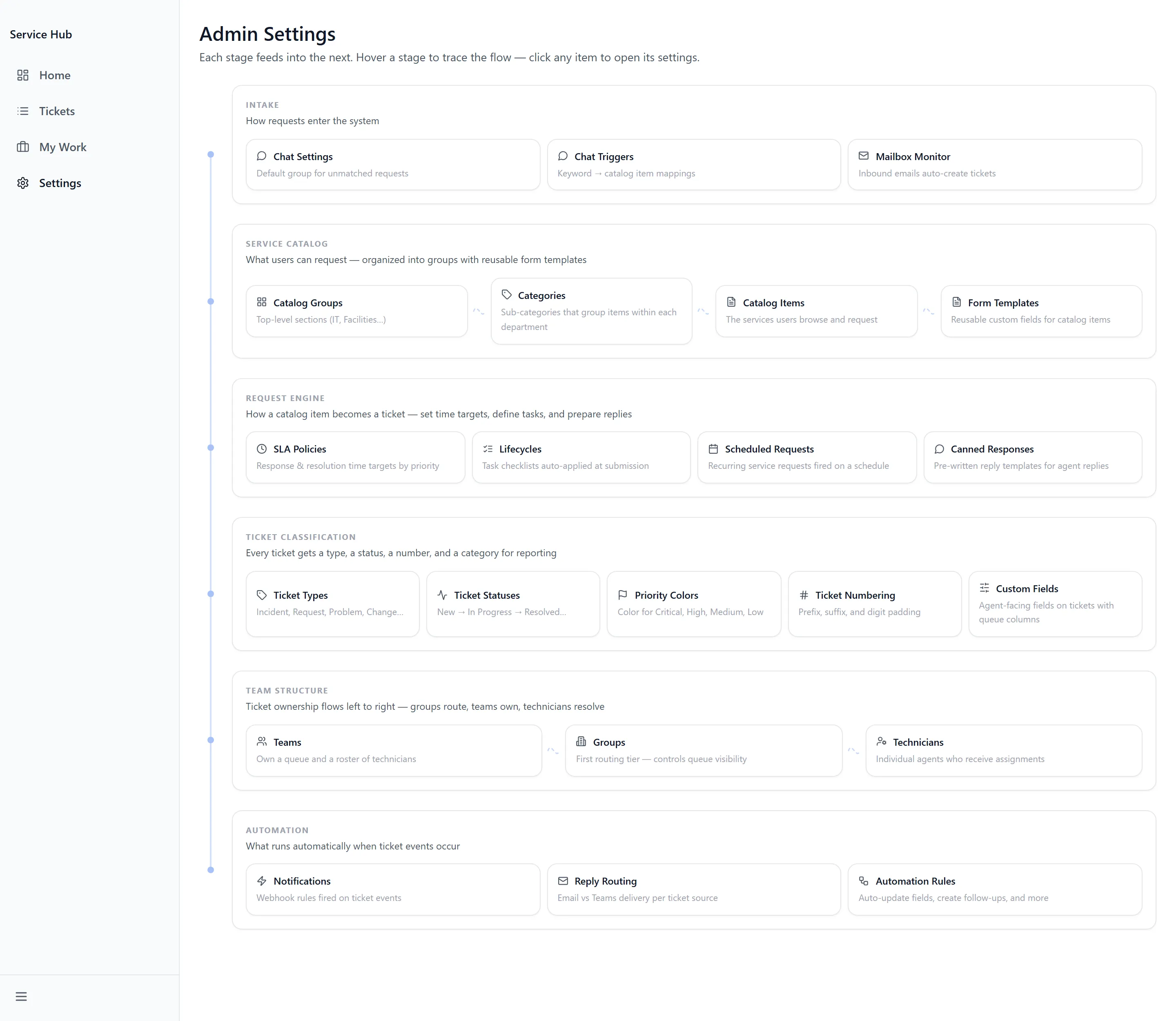
Section titled “The Settings Hub”Settings groups its pages by what they do. INTAKE covers “How requests enter the system”, and AUTOMATION covers what happens next.
| Page | What it does |
|---|---|
| Catalog Items | The individual things people can request |
| Catalog Groups | How the catalog is organised for browsing |
| Categories | Classification used across tickets |
| Teams and Groups | “First routing tier — controls queue visibility” |
| Technicians | “Individual agents who receive assignments” |
| Form Templates | The questions a request asks |
| Custom Fields | “Agent-facing fields on tickets with queue columns” |
| Mailbox Monitor | “Inbound emails auto-create tickets” |
| Automation Rules | “Auto-update fields, create follow-ups, and more” |
| Lifecycles | Multi-step work behind a single request |
| Canned Responses | Reusable replies for agents |
| Chat Settings and Chat Triggers | The assistant that can raise requests |
| Notifications | “Email vs Teams delivery per ticket source” |
Groups and Routing
Section titled “Groups and Routing”Build routing before the catalog, because catalog items point at groups. Groups are the “First routing tier — controls queue visibility”, and every group sits under a parent Team — saving one without gives “A parent Team is required before saving a group.”
Technicians are “Individual agents who receive assignments”. Adding everyone available reports “All directory users are already technicians.”
Business Hours
Section titled “Business Hours”Business hours drive response expectations, and are set per team — Add Team Override where a team works different hours from the default. Timezones are explicit, including the ones that catch people out: Arizona (no DST) and Alaska (AKT) alongside America/Chicago, America/Denver and the international zones. Saving confirms with “Business hours saved”.
The Catalog
Section titled “The Catalog”Catalog Items are the things people can ask for; Catalog Groups organise them for browsing. Each item routes to a group and carries a form.
Building a Form
Section titled “Building a Form”Form Templates holds the question sets. Each takes a Template Name, and saving an empty one is refused with “Add fields before saving as a template”.
Each field carries a Label, Help Text, Placeholder, Description and a Required field setting. The Type options:
- Choice and Dropdown — one from a list
- Multi-Check and Checkboxes — “Check any that apply”
- Long Text — “Multi-line text area”
- Number — “Numeric input”
- Email — “Email address”
- Date picker
- File Upload — “Attach a file”
- Layout — structure rather than a question
Custom Fields is a different thing and worth not confusing: those are “Agent-facing fields on tickets with queue columns” — what agents see and filter by, rather than what requesters fill in.
Intake Beyond the Catalog
Section titled “Intake Beyond the Catalog”Mailbox Monitor means “Inbound emails auto-create tickets”. A ticket arriving that way is marked “Arrived via the monitored shared mailbox”, so its origin is never ambiguous.
Chat Settings and Chat Triggers control the assistant that can raise a request conversationally, including which group it routes to.
Automation and Lifecycles
Section titled “Automation and Lifecycles”Automation Rules “Auto-update fields, create follow-ups, and more”. Conditions combine strictly — “All conditions must match (AND logic).” — so a rule with several conditions fires less often than it looks like it should. Rules can substitute ticket values such as Assignee Name, Assignee First Name and Assignee Email.
Lifecycles break one request into ordered steps with their own assignees, which is what produces the lifecycle tasks agents see in My Work. Use one where a request genuinely involves several teams in sequence — onboarding is the usual example.
Canned Responses gives agents reusable replies.
Troubleshooting
Section titled “Troubleshooting”Users report the Service Catalog is empty
Section titled “Users report the Service Catalog is empty”Solutions:
- Nothing has been published yet. Create Catalog Groups, then Catalog Items within them.
- Create Teams and Groups first — an item has nowhere to route without them.
Requests are submitted but never reach a queue
Section titled “Requests are submitted but never reach a queue”Solutions:
- Check Default group for unmatched requests. Anything not matching a rule goes there, and an unwatched default is indistinguishable from requests disappearing.
- Check the catalog item points at a group that still exists and has technicians.
- Check your agents are in the group — queue visibility follows group membership.
An automation rule isn’t firing
Section titled “An automation rule isn’t firing”Solutions:
- Conditions are combined with AND, not OR — “All conditions must match (AND logic).” Remove conditions until it fires, then add them back one at a time.
- Check the rule is Active.
Response times look wrong for one team
Section titled “Response times look wrong for one team”Solutions:
- Check business hours. Use Add Team Override where a team works different hours from the default.
- Check the timezone, particularly Arizona (no DST), which does not shift with daylight saving.
A form template won’t save
Section titled “A form template won’t save”Solutions:
- Add at least one field — “Add fields before saving as a template”.
- Give it a Template Name.
Related Articles
Section titled “Related Articles”- Getting Help with Service Hub — What requesters see once the catalog exists
- Working the Queue in Service Hub — What your agents see, and how routing reaches them
- Getting Access to Apps and Extensions — Enabling the app and granting groups access to it