
What Happens in Salesforce and NetSuite When a Quote Is Won or Lost
When a quote is marked Won or Lost, GrndCtrl can tell Salesforce and NetSuite about it without anyone re-typing the deal. This article is for the estimator who wants to know what was sent, and for the administrator who has to turn it on and keep it configured.
The Whole Thing in One Picture
Section titled “The Whole Thing in One Picture”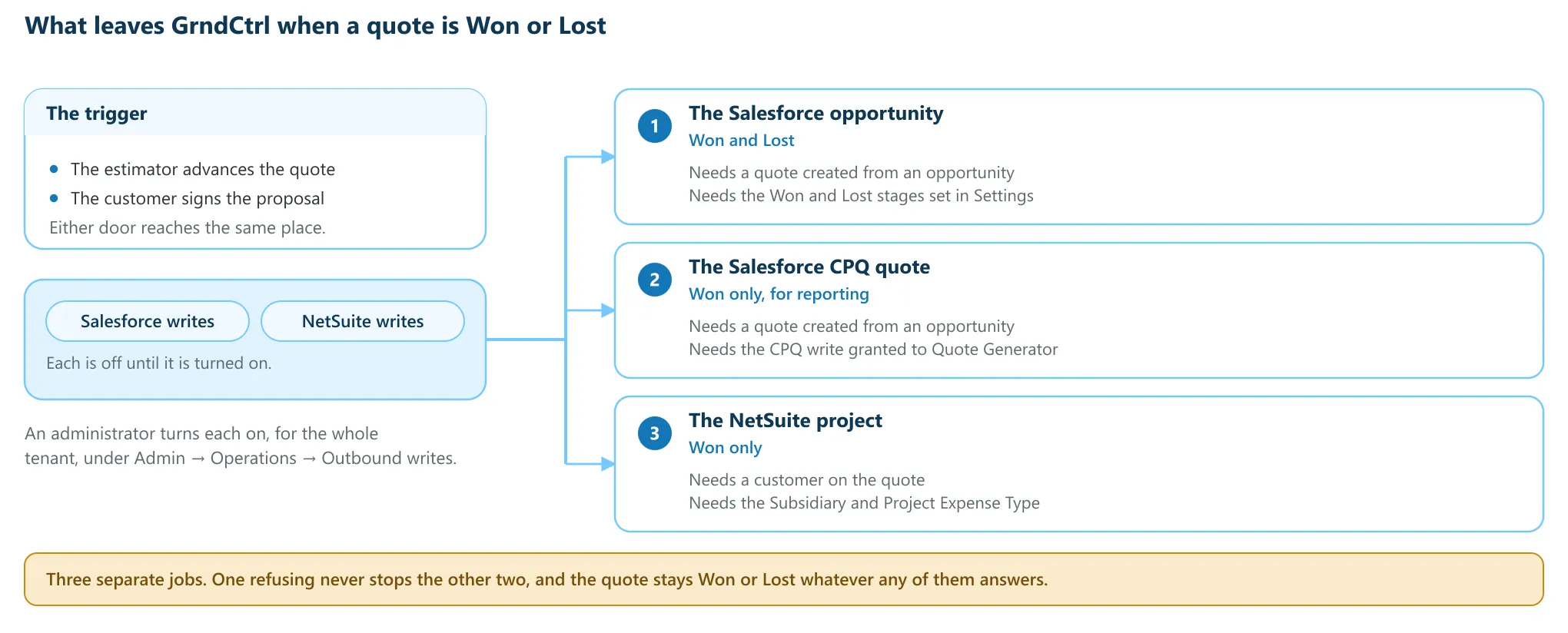
Three writes leave GrndCtrl, and each one is its own job with its own requirements:
- The Salesforce opportunity — on Won and on Lost.
- The Salesforce CPQ quote — on Won only, for reporting.
- The NetSuite project — on Won only.
When They Run
Section titled “When They Run”Two doors reach the same place. An estimator picks the stage from Advance to… on the quote, or the customer accepts the proposal and the quote reaches Won on its own. Either way the three jobs are queued at that moment and run separately.
Nothing any of them answers changes the quote. A refusal in Salesforce or NetSuite leaves the quote exactly as decided, and the reason is kept on the quote for someone to act on.
Marking a Quote Lost
Section titled “Marking a Quote Lost”With the Salesforce writes on, picking Lost opens Mark this quote Lost first: “Optionally pick why — it is written to the linked Salesforce opportunity alongside the stage. Leave it blank and GrndCtrl uses the tenant’s default, or nothing at all.” The Loss reason list is read live from Salesforce, so it offers your own values and nothing else.
- Pick a reason, then Mark Lost.
- Leave it on “No reason — leave it to GrndCtrl’s default” and your tenant’s default is used, or nothing at all if there is no default.
- Cancel leaves the quote where it was.
The dialog appears only where the Salesforce writes are on. With them off, picking Lost behaves as it always has.
The Salesforce Close-Out
Section titled “The Salesforce Close-Out”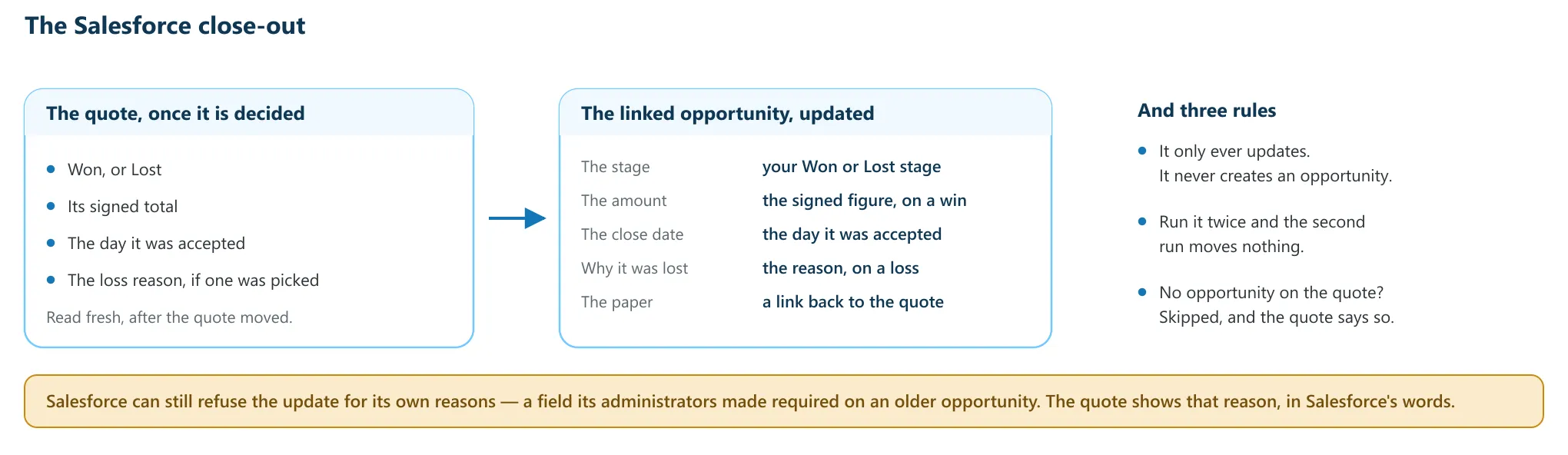
This is the write the rest of your Salesforce depends on: pipeline, forecast, capture rate, and the opportunity a rep opens. It updates the opportunity the quote was created from with the stage, the amount on a win, the close date, the loss reason on a loss, and a link back to the quote.
The stage is yours, not ours — it is whichever value your administrator picked from Salesforce’s own list for Won stage and Lost stage. The amount is the figure the customer signed for; where a quote was won by hand, it is the quote’s own total. The loss reason is the one picked on the Lost dialog, then your tenant’s default, then nothing at all — an empty reason is left alone rather than overwritten.
On the quote you get one of three banners. “Salesforce updated — {the stage}” when it landed. “Salesforce close-out failed” with Salesforce’s own message beneath it — including a refusal for reasons that have nothing to do with this quote, such as a field your administrators made required that an older opportunity never filled in. Or the skip, “Salesforce close-out”, with the sentence that says why: “this quote was not created from a Salesforce opportunity, so there is nothing to close out”, or “Salesforce close-out is not configured — set the {Won or Lost} stage in Settings” with an Open Settings link beside it.
Under the hood: the write is an update addressed by the opportunity’s own id — it never creates an opportunity, and a second run sends nothing because the values already match.
The CPQ Quote
Section titled “The CPQ Quote”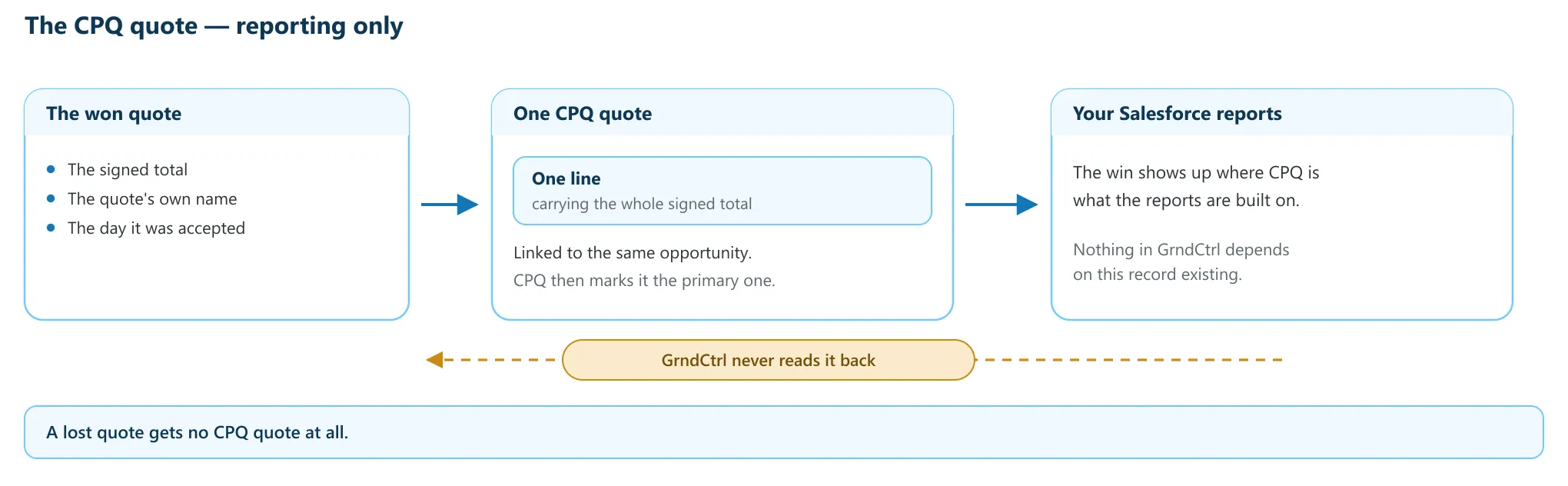
A won quote also records itself in Salesforce CPQ, and that record exists for one reason: reports built on CPQ objects keep working now that quotes are written in GrndCtrl. It is one CPQ quote carrying one line at the signed total, linked to the same opportunity, which CPQ itself then marks as that opportunity’s primary quote.
GrndCtrl never reads the record back — not the price, not the line, not to check that it arrived. A lost quote gets no CPQ quote at all.
The banner names it: “CPQ quote created” followed by the new record’s id, or “CPQ quote failed — reporting only”. The failure always says what the opportunity close-out itself did, rather than assuming — for example “The opportunity close-out is unaffected —” then “the opportunity close-out succeeded” with the stage it wrote.
Under the hood: the CPQ write is verified by its own answer and recorded on the quote at the moment it happens, because nothing is ever allowed to read it back.
The NetSuite Project
Section titled “The NetSuite Project”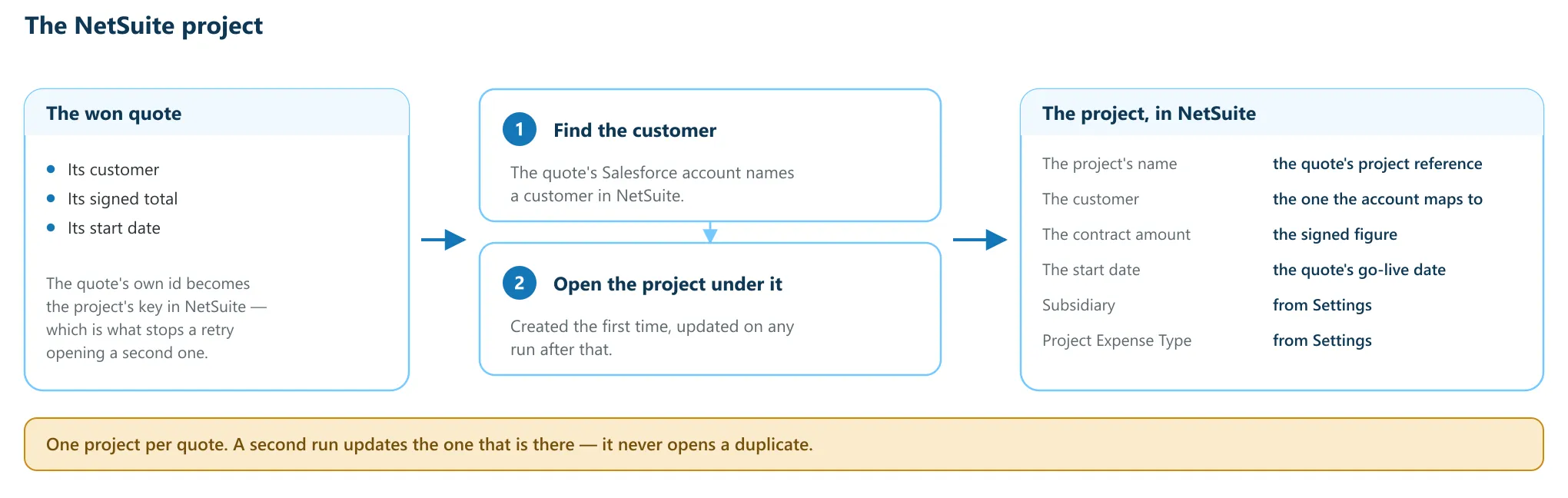
On a win, GrndCtrl opens a NetSuite project for the work. It first finds the NetSuite customer that the quote’s Salesforce account maps to, then creates the project under that customer, carrying the project name, the contract amount and the start date.
Two values NetSuite requires on every project cannot come from a quote, so an administrator sets them once: Subsidiary (NetSuite internal id) and Project Expense Type (NetSuite internal id). The project is keyed by the quote, so running the write again updates the project that is already there instead of opening a second one.
The banner reads “NetSuite project created” with the project’s id, or “already up to date” when the write found nothing to change, or “NetSuite project failed” with NetSuite’s own message. The skips name what is missing: “this quote has no customer, so there is nobody to open a NetSuite project under”, “the NetSuite project defaults are not configured — set the Subsidiary and Project Expense Type in Settings”, “this customer is not visible to the NetSuite connection, so the project has nobody to hang on”, or “the NetSuite connection returned this customer without an internal id, so the project’s customer link cannot be built”.
If the estimator picked an existing project on the quote’s NetSuite · Project cell, no
project is created: the won quote’s tasks are added to that project instead, and the
banner reads “Tasks added to NetSuite project {id} · {n} tasks”. See The Quote
Header.
Under the hood: a customer the connection does not return is reported as not visible, never as deleted — a connection can only say what it was shown.
What the Quote Shows
Section titled “What the Quote Shows”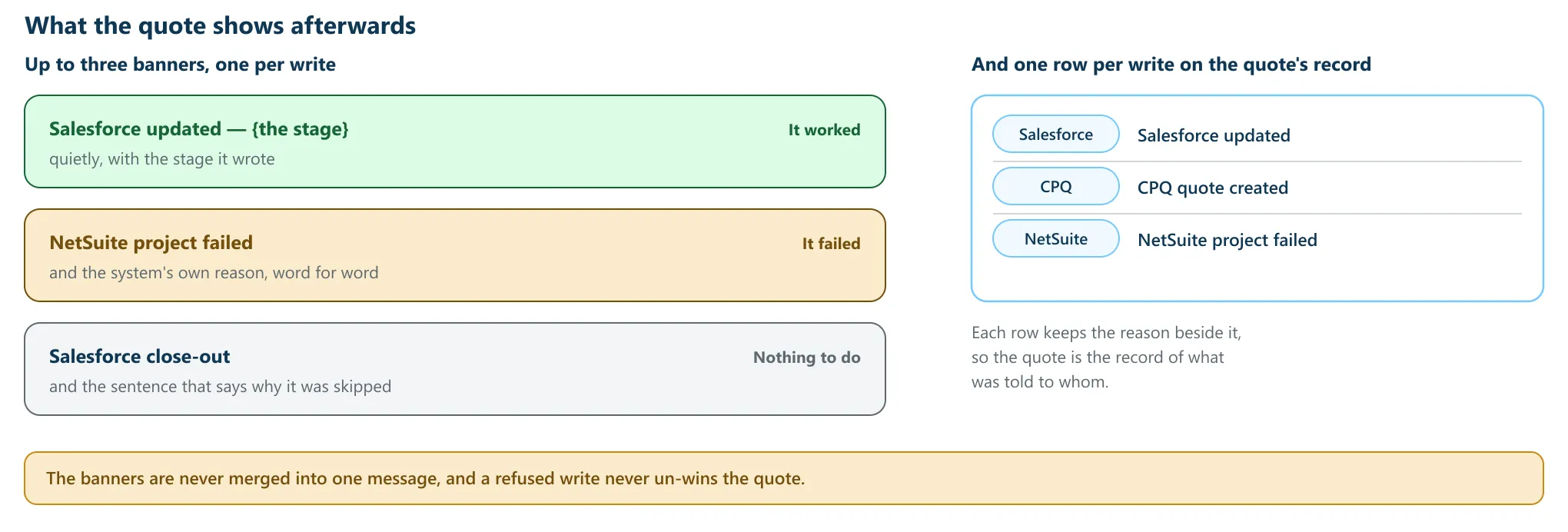
Each write gets its own banner, and they are never merged into one message: a CPQ failure is a reporting gap and a close-out failure is a pipeline one, and a single sentence covering both would hide which is which. A write that landed says so quietly; a write that was refused shows the other system’s own words.
The quote’s record keeps the same three answers as rows, under a Salesforce, CPQ or NetSuite badge — “Salesforce updated”, “Salesforce refused the update”, “Salesforce close-out skipped”, “CPQ quote created”, “CPQ quote failed”, “CPQ quote skipped”, “NetSuite project created”, “NetSuite project failed” and “NetSuite project skipped” — each with the reason beside it. There is no retry button and no re-send: the record keeps the reason, and an administrator resolves it in Salesforce, in NetSuite, or in Settings.
If nothing could be queued at all you get one more banner, “The outbound writes could not be queued”, which says plainly that “the transition stands, but nothing was sent”. The quote is never un-won.
Under the hood: every attempt writes its own row when it happens, so the quote answers what was told to whom without anyone going and looking in the other system.
Turning the Writes On and Off
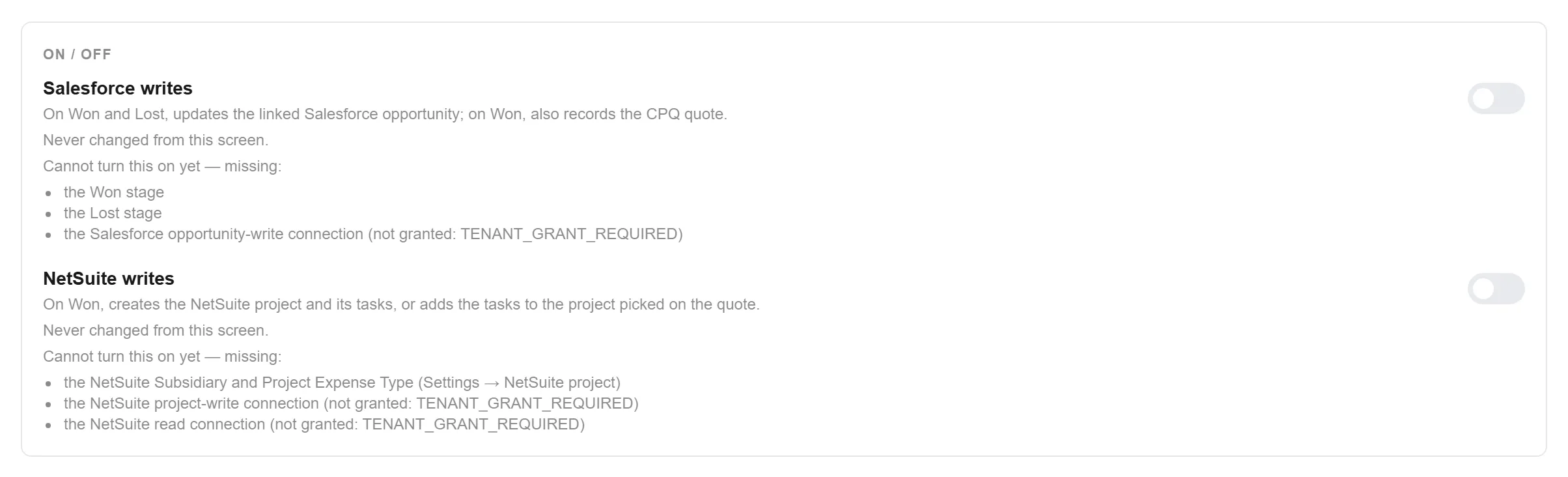
Section titled “Turning the Writes On and Off”Open Admin → Operations → Outbound writes. The page describes itself: “What GrndCtrl tells Salesforce and NetSuite when an estimator marks a quote Won or Lost.” The first card, On / off, holds the two switches; the cards below it hold what the writes need. Set those first — the switches are the last thing you touch.
- Under Salesforce close-out, pick a Won stage and a Lost stage. Both lists hold your own Salesforce values, so there is nothing to type.
- Optionally pick a Default loss reason (optional), used whenever nobody picks one on the Lost dialog. Leaving it on “None — leave it empty when nobody picked one” writes no reason at all.
- Click Save. Saving the stages never turns the writes on or off.
- Under NetSuite project, enter Subsidiary (NetSuite internal id) and Project Expense Type (NetSuite internal id), then click Save. These are NetSuite’s own internal ids, and they are yours — never copy them from another company or another environment.
- Under On / off, turn on Salesforce writes, NetSuite writes, or both. Each asks first — for example Turn on NetSuite writes? “Won quotes will create NetSuite projects from now on.” — and you confirm with Turn on.
Each switch says what it covers:
- Salesforce writes — “On Won and Lost, updates the linked Salesforce opportunity; on Won, also records the CPQ quote.”
- NetSuite writes — “On Won, creates the NetSuite project and its tasks, or adds the tasks to the project picked on the quote.”
Turning a switch off takes effect at once, with no question asked. Under each switch a line says who last changed it and when — “Turned on by {email} · {date}” — or “Never changed from this screen.”
What Estimators See
Section titled “What Estimators See”On every quote, a small ring beside the Salesforce · Opportunity and NetSuite · Project labels on the quote’s overview shows each switch: filled when the writes are
on, hollow when they are off. Hovering it says so, for example “NetSuite writes are off
— Won will not create a NetSuite project”. With the NetSuite writes off, the quote’s
Created on Won cell is not shown. See The Quote
Header.
A quote won or lost while a switch is off keeps a line in its record saying what was held back, for example “Salesforce writes are turned off (Quote Gen Admin › Outbound writes), so this outcome was not written to the opportunity”. No banner appears for it.
Troubleshooting
Section titled “Troubleshooting”The quote is Won but nothing was sent
Section titled “The quote is Won but nothing was sent”There are no banners at all on a quote decided before the writes were turned on, and none on a quote in any stage other than Won or Lost. Hover the ring beside the Salesforce or NetSuite label on the quote’s overview: a hollow ring means that system’s writes are off. The quote’s record says the same — the AI Record’s What happened log carries a line such as “NetSuite writes are turned off (Quote Gen Admin › Outbound writes), so no NetSuite project was created”. Turning the switch on later does not send anything for quotes already decided.
Salesforce was skipped but the quote looks fine
Section titled “Salesforce was skipped but the quote looks fine”A skip is normal, not an error. The commonest one is “this quote was not created from a Salesforce opportunity, so there is nothing to close out” — a quote started by hand has no opportunity to close, and neither does a clone of one that had. Start the next quote from the opportunity and both Salesforce writes have something to write to.
Salesforce or NetSuite refused the write
Section titled “Salesforce or NetSuite refused the write”The banner carries that system’s own message, and it is the message to act on. A required field left empty on an older opportunity, a customer the connection cannot see, an internal id that is not right for your account: all of them are fixed in that system or in Outbound writes, not on the quote. The quote stays Won or Lost either way.
Only the CPQ write failed
Section titled “Only the CPQ write failed”That is a reporting gap, not a pipeline one, which is why it has its own banner. The banner states what the opportunity close-out actually did, so you can see at a glance whether the deal reached Salesforce. Nothing in GrndCtrl depends on the CPQ record.
Related Articles
Section titled “Related Articles”- Quote Generator Help
- Creating Quotes with Quote Generator
- The Quote Header and Document Settings: Reference, People and Linked Records
- Sending a Quote for Signature
- After the Customer Signs
- Connecting Your Systems with Integrations
- Product Families: Where the Names Come From and How They Stay in Line with NetSuite and Salesforce