
Who Can Do What on a Quote
What the customer can change on the signing link, and what the estimator, the Approver and an admin can do on the quote.
The Matrix
Section titled “The Matrix”| Action | Customer, on the link | Estimator, on the Customer (link) view | Approver | Admin |
|---|---|---|---|---|
| Tick or untick an option | Yes | Yes, then Save | Yes | Yes |
| Change a quantity | Yes, not below the minimum | Yes, then Save | Yes | Yes |
| Set the Minimum at signing | No | Yes, on the Estimator view | Yes | Yes |
| Change prices, lines or wording | No | Yes, on the Estimator view | Yes | Yes |
| Send the quote | No | With Send quotes | With Send quotes | With Send quotes |
| Send a reminder with the same link | No | With Send quotes | With Send quotes | With Send quotes |
| Enter a stage that requires approval | No | With the stage’s role | With the stage’s role | With the stage’s role |
| Sign for your organisation | No | When switched on under Signatures shown | When switched on under Signatures shown | When switched on under Signatures shown |
| Accept or Decline the proposal | Yes | No | No | No |
| Change Admin settings | No | No | No | Yes |
Once a quote is in a locked stage (by default won, lost or archived) it is read-only for everyone on staff. After the send, the customer’s choices on their link reach the quote when they sign. Someone without Edit quotes, where your organisation gates editing, sees every quote read-only; see Without Edit Quotes.
On the Customer’s Link
Section titled “On the Customer’s Link”- Options: any optional row can be ticked or unticked. The total moves by the row’s printed price.
- Quantities: any row with a count can be changed, up or down, but not below its minimum. The page will not sign until the count reaches it. There is no maximum.
- Nothing else: prices, wording and the lines themselves are the estimator’s.
The Estimator’s Copy of the Link
Section titled “The Estimator’s Copy of the Link”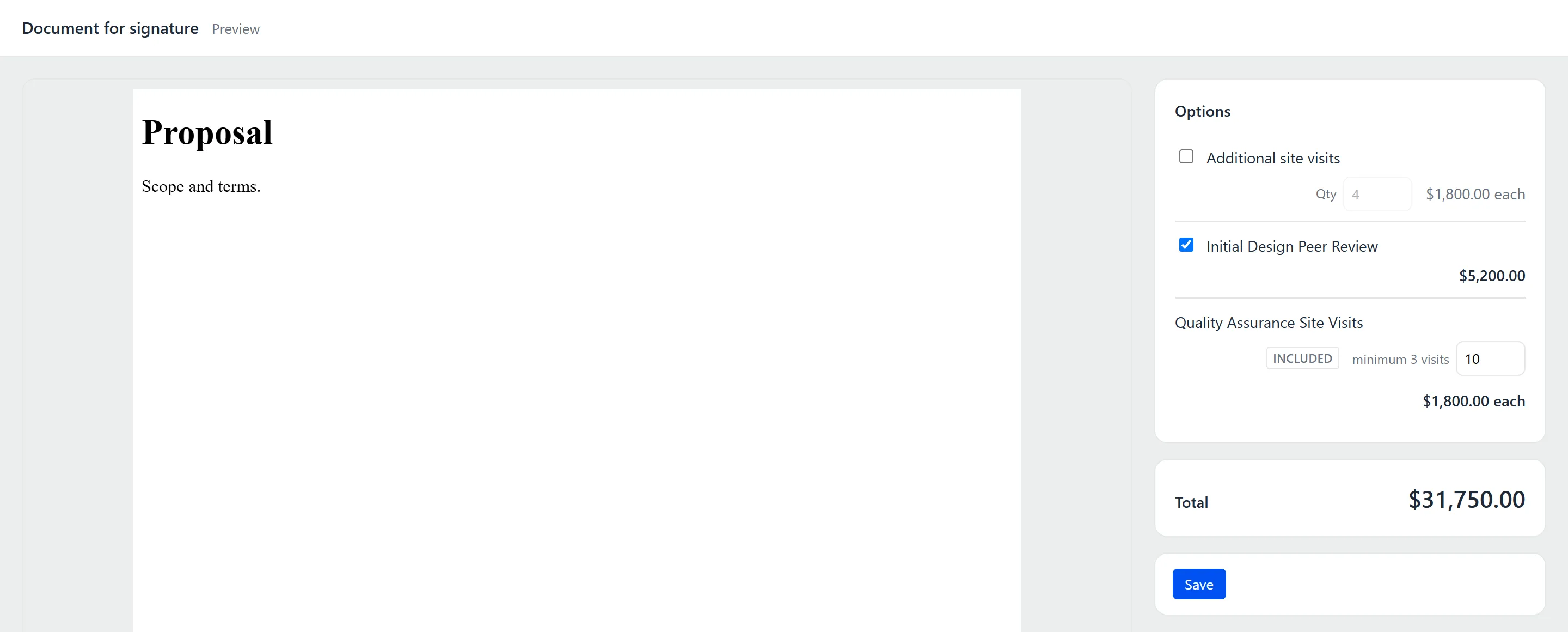
The Customer (link) view on a quote is the customer’s signing page, without the signing controls. Tick options and change quantities exactly as the customer would, then press Save: the quote takes the same choices. The same minimum applies.
The minimum is set on the quote, not on the link: Minimum at signing sits on a product priced per unit, on the Estimator view.
Approvers
Section titled “Approvers”An Approver is a person named on the quote, not a permission. The Approver the quote routes to is told when the customer answers, and signs for your organisation only when switched on under Signatures shown with a signature on file. Naming someone grants nothing: entering a stage that requires approval still needs the stage’s role.
Permissions
Section titled “Permissions”An admin gives these under Admin → People → Permission roles.
| Permission | What it does |
|---|---|
| Send quotes | Once any role carries it, only its holders can send. Until then, “anyone with Quote Generator access can send a quote.” |
| Approve stage transitions | Enters a stage that requires approval when the stage names no role. A stage that names a role takes that role. |
| Edit quotes | Once any role carries it, only its holders can change a quote or start a new one. Until then, “No permission role carries Edit quotes yet, so anyone with Quote Generator access can change a quote.” Leaving a note on a quote is not a change, so it needs no permission. |
Changing Admin settings needs a GrndCtrl administrator. It is not a permission role: the old Manage configuration permission did nothing and is gone from the People page.
The People page says whether each wall stands: Sending: gated or Sending: open, and Editing: gated or Editing: open. The moment a role carries Edit quotes, everyone without it sees quotes read-only, so give that role straight away to everyone who should keep editing, or tick Edit quotes on a role they already hold. See Permission Roles.
Without Edit Quotes
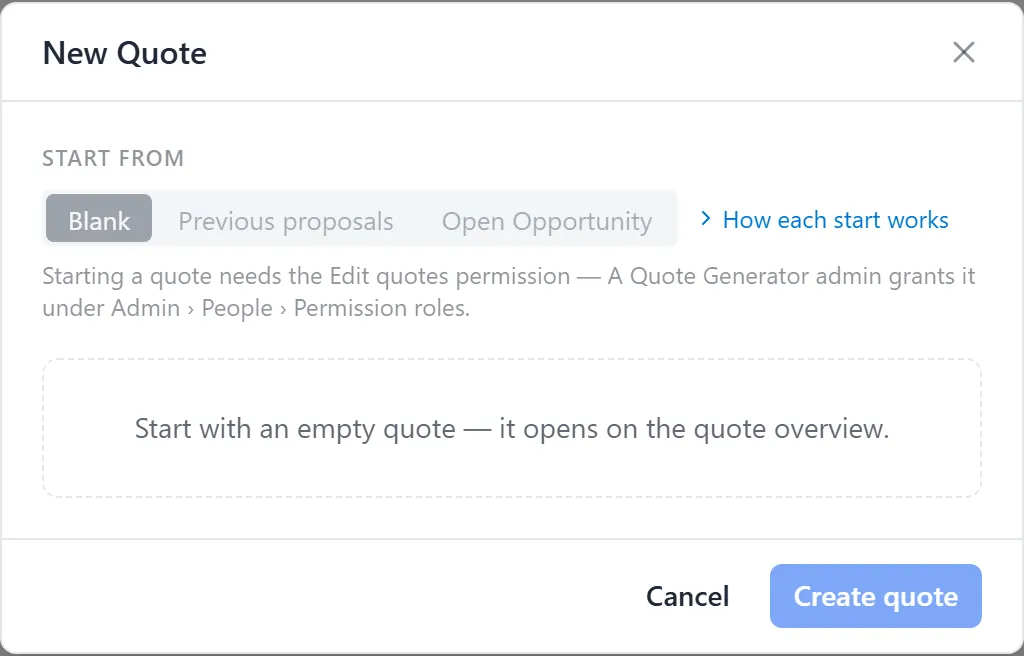
Section titled “Without Edit Quotes”Where a role carries Edit quotes, someone without it can still open every quote, read it, see the customer’s view with Preview, download files from Proposal ▾ where your organisation offers them, and leave a note. A quote’s overview says why it cannot be changed: “Changing a quote needs the Edit quotes permission. A Quote Generator admin grants it under Admin › People › Permission roles.” Edit Quote reads View lines. See When a Quote Is View-Only.
New Quote still opens, with every start dimmed. Under the row, the reason, “Starting a quote needs the Edit quotes permission”, and where it is granted, “A Quote Generator admin grants it under Admin › People › Permission roles.” Create quote cannot be pressed.
Troubleshooting
Section titled “Troubleshooting”I can’t send the quote
Section titled “I can’t send the quote”The quote says “Sending a quote needs the Send quotes permission. A Quote Generator admin grants it under Admin › People › Permission roles.” Ask an admin for a role that carries Send quotes.
I can only view quotes, and every start in New Quote is dimmed
Section titled “I can only view quotes, and every start in New Quote is dimmed”Your organisation gives Edit quotes to a role, and you do not hold one. Ask a Quote Generator admin for a role that carries it, under Admin → People → Permission roles. If a quote says “Could not read who may edit quotes, so this quote opens view-only. Reload to try again.”, reload the page.
Save on the Customer (link) view is refused
Section titled “Save on the Customer (link) view is refused”The quote has been sent, a count is below its minimum, or you do not hold Edit quotes. A sent quote is read-only; lower the Minimum at signing or raise the count.