
Administering Change Management
This article is for administrators of Change Management. It covers the three pages under Admin Settings — who can use the app, the review groups that approvals route to, and notifications. For raising and reviewing changes, see Raising a Change Request.
App Users
Section titled “App Users”App Users is who can use Change Management. Find people with “Search name, email, or job title…”. Saving confirms with “Saved.”
Review Groups
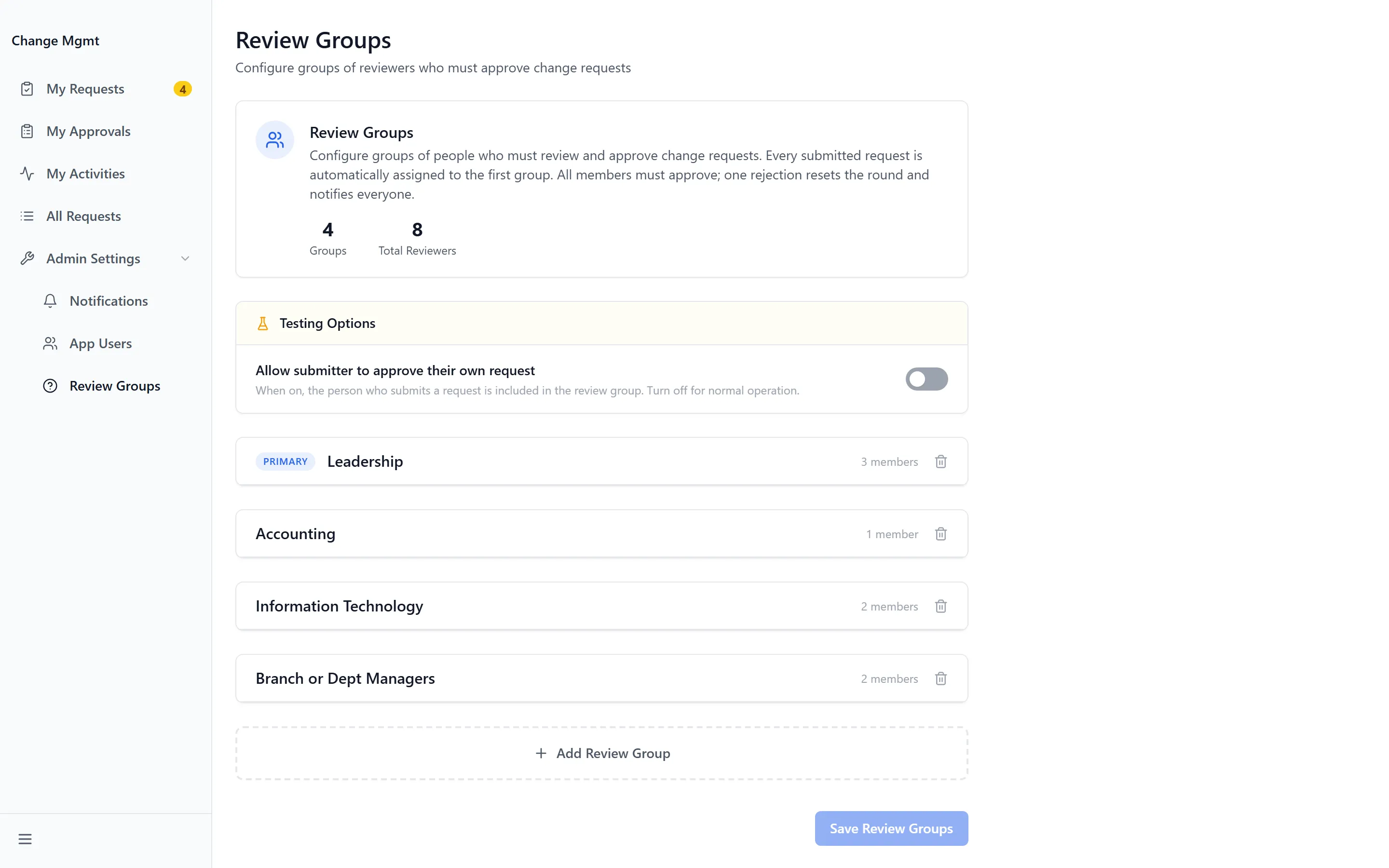
Section titled “Review Groups”Review Groups is the page that makes approvals work. Each group corresponds to an area on the change matrix, so marking an area on a request routes it to that group’s members.
New Group creates one. A group carries a display name — “e.g. Leadership” — and an internal identifier — “e.g. leadership”. Members are added with “Search name, email, or title…”, and Remove group deletes one.
Review the groups whenever people change role. Approval routing follows group membership, not job title, so someone who has moved on keeps receiving approvals until they are removed.
Notifications
Section titled “Notifications”Notifications posts to a channel as changes move. Each event is Enabled or Disabled on its own:
| Notification | Fires when |
|---|---|
| New request | “A new change request has been submitted” |
| Request Assigned | “A change request has been assigned to a reviewer” |
| Request Approved | “A change request has been approved” |
| Rejection | “A change request has been rejected” |
| Completion Notification | “A change request has been marked as completed” |
| Any change | “Any status change on a change request” |
Posts go to the Incoming Webhook URL. Saving without one returns “Enter a webhook URL first.”
App Base URL is what makes the links in those posts work — it is the address a notification points back to when someone clicks through to the request.
Troubleshooting
Section titled “Troubleshooting”Changes sit Under Review and nobody responds
Section titled “Changes sit Under Review and nobody responds”Solutions:
- Check the review group for the marked area has members. An empty group cannot respond, and nothing flags this.
- Check Request Assigned is Enabled, so reviewers are told at all.
- Check the reviewers are in App Users. Group membership alone does not grant access to the app.
Notification links go nowhere
Section titled “Notification links go nowhere”Solutions:
- Check App Base URL. It must be the address your users actually reach the app on.
- Confirm it is not still the placeholder development address.
No notifications are posting at all
Section titled “No notifications are posting at all”Solutions:
- Check the Incoming Webhook URL is set. Without it, saving returns “Enter a webhook URL first.”
- Check the individual events are Enabled — they are set separately, so some can be live while others are not.
The wrong people are being asked to approve
Section titled “The wrong people are being asked to approve”Solutions:
- Routing follows the change matrix. Check which areas the requester marked, then check that group’s membership under Review Groups.
- Remove anyone who has changed role. Membership does not follow job title.
Related Articles
Section titled “Related Articles”- Raising a Change Request — What your users see, and how the matrix drives routing
- Getting Access to Apps and Extensions — Enabling the app and granting groups access to it
- What’s Happening — Announcing an approved change to everyone