
Contributing to the Care Fund
The Care Fund takes a contribution straight out of your paycheck — either a fixed amount every check, or a single donation. You choose the amount and sign an electronic payroll authorization; HR processes it from there. This article covers the whole flow, including the signature each change needs.
Finding Your Way Around
Section titled “Finding Your Way Around”Open Care Fund from the app launcher. Everyone has one page:
- My Election — your contribution, and everything you can do to it
If you also process other people’s elections you will see All Elections and Settings as well. Those are covered in Administering the Care Fund.
How an Election Moves
Section titled “How an Election Moves”Every contribution is an election, and it carries a status badge wherever it appears.
| Status | What it means |
|---|---|
| Pending HR | Signed and submitted. Waiting for HR to process it. |
| Active | Approved. The deduction is running. |
| Change Pending | You signed a new amount. The old one keeps running until HR processes it. |
| Cancellation Pending | You signed a cancellation. Deductions continue until HR confirms. |
| Cancelled | Stopped. You can enrol again whenever you want. |
| Rejected | HR did not approve it. Any note they left appears on the card. |
| Completed | A one-time donation that has been processed. |
The page also shows the stage you are at as a short progress line — Submitted, then HR Review, then Active.
Choosing How to Give
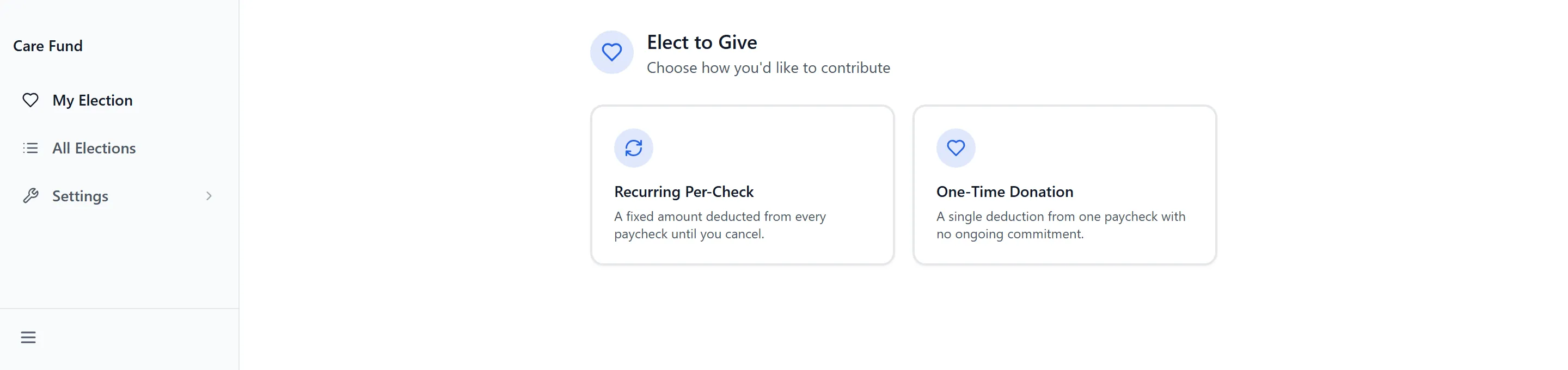
Section titled “Choosing How to Give”With nothing set up, My Election offers two cards:
- Recurring Per-Check — “A fixed amount deducted from every paycheck until you cancel.”
- One-Time Donation — “A single deduction from one paycheck with no ongoing commitment.”
You can hold both at once. A one-time donation sits alongside a recurring election rather than replacing it.
Setting Your Amount
Section titled “Setting Your Amount”- Choose Recurring Per-Check or One-Time Donation.
- Pick one of the quick amounts, or type your own into Per-Check Amount. The hint reads “Any amount between $1 and $500”.
- Select Continue.
Anything outside that range is refused with “Amount must be between $1 and $500”, and an empty or unreadable entry with “Please enter a valid amount”. The check happens when you select Continue, not as you type.
Reviewing and Signing
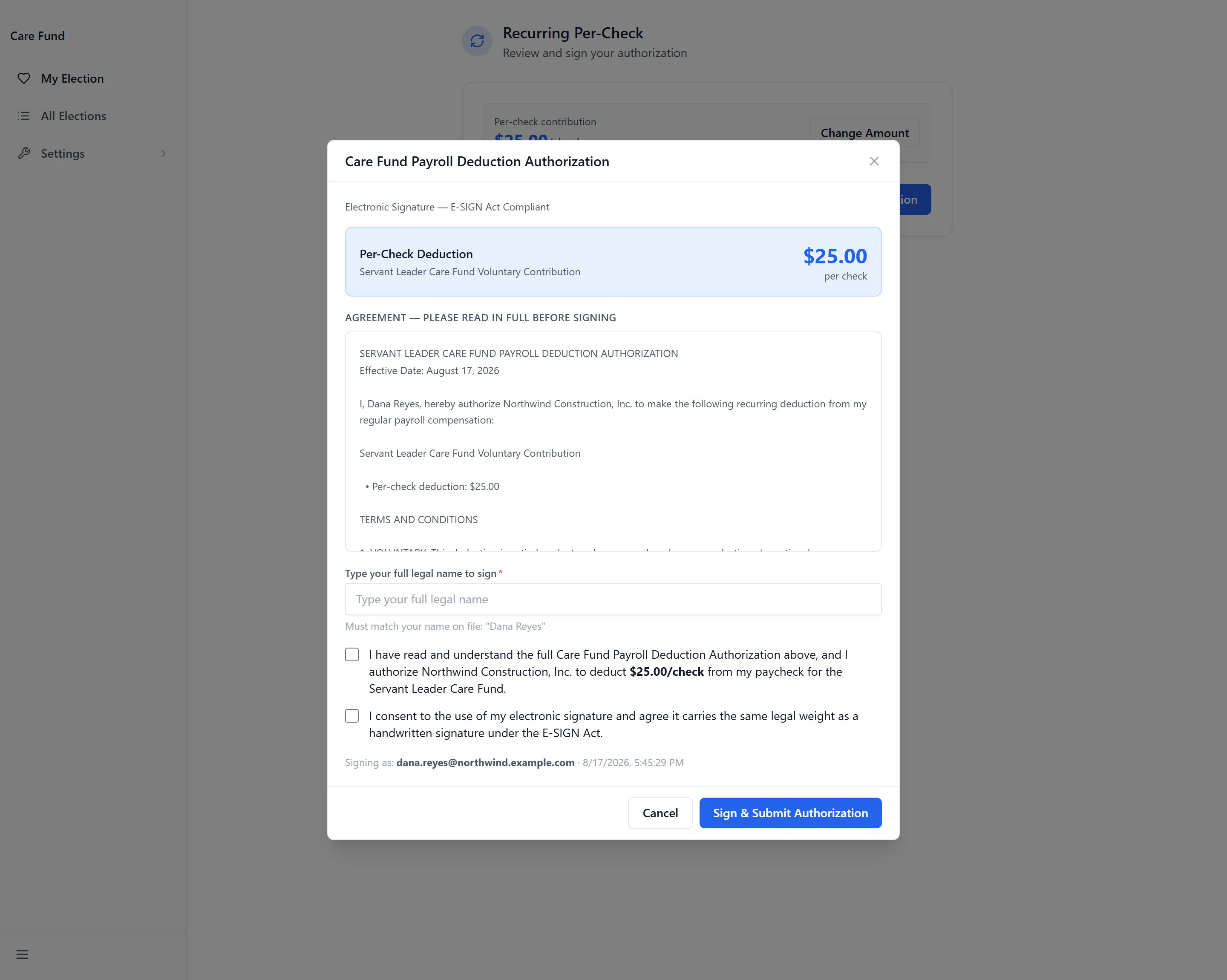
Section titled “Reviewing and Signing”The review step restates the amount and offers Change Amount, Back, and Review & Sign Authorization. Selecting the last of those opens Care Fund Payroll Deduction Authorization, marked “Electronic Signature — E-SIGN Act Compliant”.
- Read the agreement in full — the panel is headed “Agreement — Please read in full before signing”.
- Under Type your full legal name to sign, type your name.
- Tick both acknowledgement boxes.
- Select Sign & Submit Authorization.
- A final Confirm Your Election panel appears. Read it and select Confirm & Submit, or Go Back.
Your Active Election
Section titled “Your Active Election”Once HR approves it, My Care Fund Election shows your Per-Check Contribution with its status badge, and a document icon that opens what you signed. Selecting the card opens Care Fund Election, which holds:
- Election Details — Per-Check Deduction, Pending Change, Submitted, Effective Date and Reviewed By
- Amount History — every amount this election has run at
- View Signed Document, Change Amount and Cancel Election
Changing or Cancelling
Section titled “Changing or Cancelling”Both need their own signature, and both apply only to an active election.
- Open the election and choose Change Amount or Cancel Election.
- For a change, enter the New Per-Check Amount and select Next: Sign Authorization.
- Sign as before, then confirm.
The election moves to Change Pending or Cancellation Pending. Your existing deduction keeps running until HR processes it — a cancellation is not immediate, and deductions already taken are not returned. A new amount has to differ from the current one, or it is refused with “New amount must be different”.
One-Time Donations
Section titled “One-Time Donations”With a recurring election already running, Donate Now adds a single extra contribution. It is a separate record with its own signature and its own HR approval, and it does not change your recurring amount. While it waits it shows as One-Time Donation with “Awaiting HR processing”, and becomes Completed once processed.
Your Signed Authorization
Section titled “Your Signed Authorization”Every signature is kept. The document icon opens a record showing your details, the election, the full agreement text as it stood when you signed, and the signature block. Print / Save PDF keeps your own copy.
Where your employer connects Care Fund to its HR system, the same document is filed to your employee record automatically when you sign.
Contribution History
Section titled “Contribution History”Below your current election, History lists everything that has finished — cancelled elections, rejected ones, and processed one-time donations — each marked One-Time or Recurring with the date it was submitted. Use Show and Hide to expand it.
Troubleshooting
Section titled “Troubleshooting”Care Fund isn’t in my launcher
Section titled “Care Fund isn’t in my launcher”Solutions: three things have to be true. Check them in order.
- An administrator has enabled Care Fund in the App Store.
- Your group has been granted access to it.
- You have signed out and back in since that change. See Getting Access to Apps and Extensions.
It says my name does not match
Section titled “It says my name does not match”Solutions:
- Type the name exactly as the hint shows it, including middle names or initials. Capitalisation does not matter; spelling and spacing do.
- Where the name on file is wrong or out of date, ask HR to correct it. Nothing in Care Fund can override the comparison.
I can’t change or cancel my election
Section titled “I can’t change or cancel my election”Solutions:
- Change Amount and Cancel Election appear only while the election is Active. At Pending HR, Change Pending or Cancellation Pending there is nothing to select.
- If you need to stop something before HR has processed it, contact HR directly.
It says I already have an active election
Section titled “It says I already have an active election”Solutions:
- You can hold one recurring election at a time, and “You already have an active Care Fund election” counts one that is still waiting on HR. Wait for it to be processed, then change the amount rather than enrolling again.
- A one-time donation is not blocked by this — use Donate Now.
My election has said Pending HR for a while
Section titled “My election has said Pending HR for a while”Solutions:
- Approval is HR’s, and nothing on this page can advance it.
- Check the card for a note. A rejected election shows the reason where HR left one.
- Contact whoever administers the Care Fund for your organization.
It’s approved but not on my paycheck
Section titled “It’s approved but not on my paycheck”Solutions:
- A deduction starts on the first full pay period after HR approval, so a payroll run already in progress will not include it.
- Check Effective Date in the election details — that is the date HR approved it.
Related Articles
Section titled “Related Articles”- Administering the Care Fund — For the people who process elections and configure the app
- Requesting a Phone with the Employee Phone Program — The other payroll authorization you may be asked to sign
- Getting Access to Apps and Extensions — Start here if Care Fund is missing or you see “Access Denied”