
Tuning Quote Generator
Quote Generator is tuned by its tenant, not by support. This article lists every lever an administrator can move, where it lives, what it ships as, what it changes, and what to look at afterwards to tell whether the move helped. A few settings are applied by NXTC rather than moved here; How Quote Generator Is Configured says which, and how the two meet.
Which Lever Changes Which Step
Section titled “Which Lever Changes Which Step”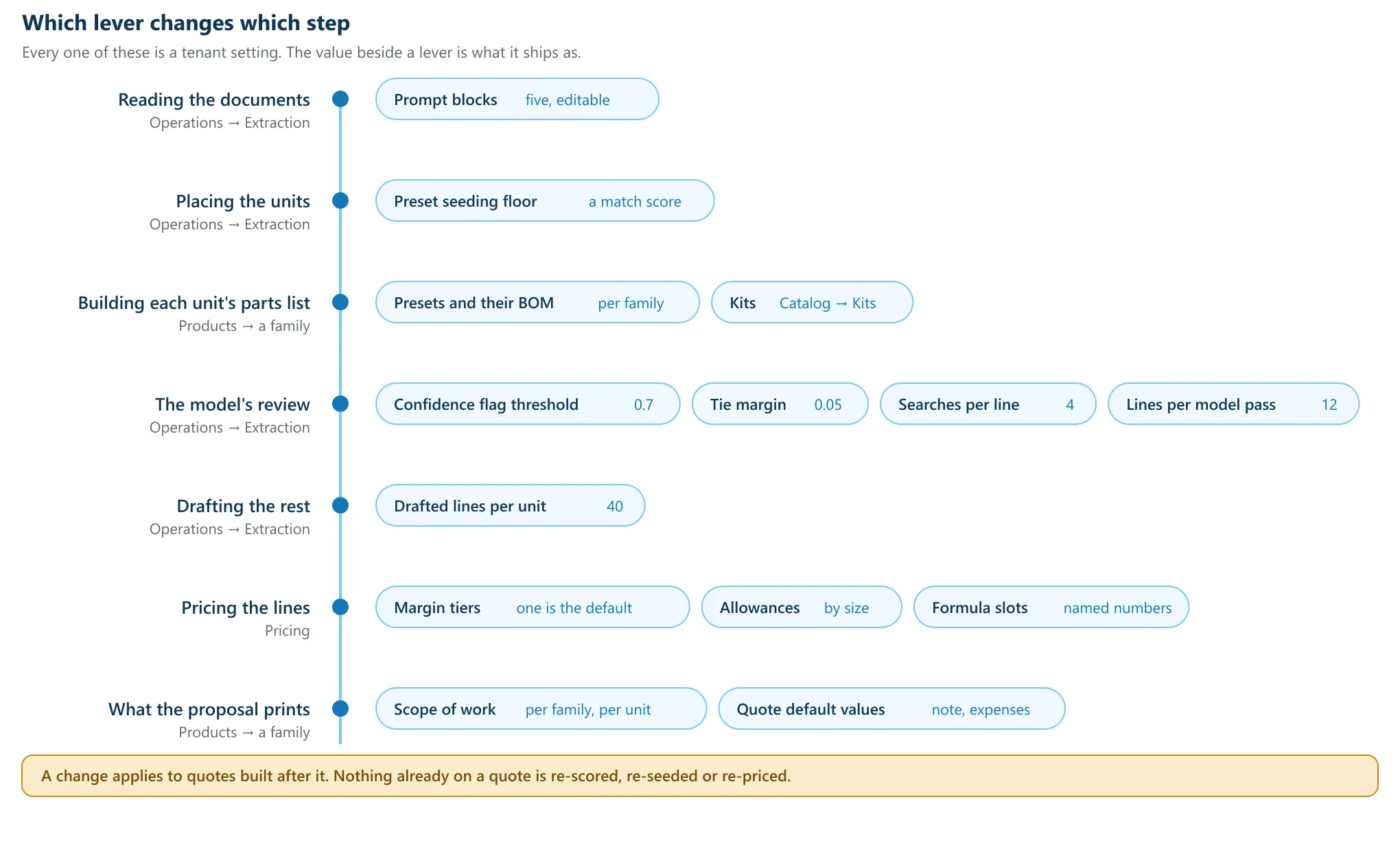
Model Binding
Section titled “Model Binding”Open Admin → Operations → Prompt Management. Under Knobs, the Model binding card holds six settings and says what it is for: “how the model binds document lines to catalog parts, and what it may spend doing it”.
Every setting works the same way. Type a value, click Save, and the row is badged overridden. Click Reset to default to put it back. A value outside its range is refused before anything is written, and the refusal names the range.
| Setting | Ships as | Range | What it changes |
|---|---|---|---|
| Confidence flag threshold | 0.7 |
0 to 1 |
The bar under which a bind is marked “worth a closer look”. A flag, never a filter. |
| Tie margin | 0.05 |
0 to 1 |
The gap a tie’s winner must clear over the runner-up before it is chosen without you. |
| Searches per line | 4 |
0 to 12 |
“Catalog searches the model may make for one line before it must decide.” |
| Lines per model pass | 12 |
0 to 60 |
“Document lines one model pass works through before handing the rest to the next pass.” |
| Drafted lines per unit | 40 |
0 to 80 |
“The most lines the model may propose for one unit when it drafts a parts list.” |
| Products per opportunity seed | 12 |
1 to 40 |
The most products one opportunity seed may propose. Shown only where prices are given rather than built from parts. |
Confidence flag threshold: what to watch
Section titled “Confidence flag threshold: what to watch”Raising it flags more binds; lowering it flags fewer. It removes nothing either way, so it cannot make a quote wrong. What it decides is how much of the quote asks for a second pair of eyes. Build a quote and count the flagged lines: if almost every line carries the flag, the bar is above what your catalog can support and you are training estimators to ignore it.
Searches per line: what to watch
Section titled “Searches per line: what to watch”This is the spend lever. Each search is a round trip, so lowering it caps what one difficult line can cost, and raising it gives the model room to prove a part is absent rather than guess. Read the declines on the AI Record afterwards. A decline that names what it searched is worth more than a bind the model was pushed into.
Lines per model pass: what to watch
Section titled “Lines per model pass: what to watch”A pass is a batch, not a second opinion. A line decided in one pass leaves the queue and is not looked at again, so every pass after the first is deciding lines the first never saw. A small number means a long package runs many passes, and every pass boundary costs time that produces no decisions.
What to watch. After raising it, check that a large build decided every line it extracted, and that the build did not get slower. Raise this on its own: moving it and Searches per line in the same change makes the result unreadable.
The Preset Seeding Floor
Section titled “The Preset Seeding Floor”On the same page, below the Model binding card. It is a whole number entered as a percentage, and the field says what it is: “% match required to load a preset BOM”.
The card states the rule: “A unit only loads its matched preset’s BOM when the match scores at or above this floor”. Below the floor the unit arrives bare with its extracted specifications and waits under Needs attention as Units with no parts list yet, where the preset stays a suggestion under Change base.
What to watch. Lower it and more units arrive carrying a parts list nobody chose. Raise it and more units arrive bare for the model to draft. Build the same package at two settings and compare how many lines came from the preset against how many the model drafted. The AI Record names the source of every line.
Prompt Blocks
Section titled “Prompt Blocks”Same page, under Prompt blocks. Five pieces of prose reach the model as it reads
your documents: honesty, structural_focus, line_focus, not_a_line_item and
unit_framing. The last two are shared by every stage of the read. Edits are audited
and confirmed, and a reset returns the block to the composed default for your tenant’s
shape.
Products: Families, Presets and Quote Defaults
Section titled “Products: Families, Presets and Quote Defaults”Admin → Products. A family is the shape of a thing you sell and its Specifications are its fields. A preset pins some of those fields to real values and carries the parts and labor a proven design starts from.
- Families and Specifications decide what the extraction can recognise on a page. A specification nothing declares cannot be read off a document.
- Presets decide what a matched unit arrives carrying. They are versioned: every edit creates the next version, and a quote keeps the version it was built with.
- Preset mining proposes presets out of the quotes you have already built.
- Quote default values, on a family, is what the proposal prints for every unit of that family. A value set on the unit itself always wins, so per-quote edits keep working and quotes already built do not move.
What to watch. After changing a family default, build a quote and preview the PDF rather than reading the field back. The default is inherited by new units only.
Scope of work: what the proposal prints under a unit
Section titled “Scope of work: what the proposal prints under a unit”The scope a unit is performed under reaches the customer’s paper directly, and it is composed rather than typed as one block. A section is a heading, an introduction and any number of bullets, and a section may have any of the three: a heading with bullets and no introduction is a section, and a blank field is not stored, so it prints nothing rather than an empty line.
It is written in two places, and they are the same editor:
- On a family, under Quote default values, as the wording every unit of that family starts from.
- On the quote, on the unit’s own card. The control is collapsed and says what it holds: “Scope of work” with the number of sections, or “No scope of work” when there are none.
Each section has a Heading and an Introduction above its bullets, and the fields say what they are for: “Heading — e.g. ELECTRICAL SPECIFICATIONS (optional)”, “A sentence or two under the heading (optional)” and “One line of scope”. Sections can be reordered with Move up and Move down, and removed.
A unit that has nothing of its own shows the family’s wording and says so: “Showing {the product family}’s wording. Editing here writes a version for this row only”. Removing every section from a unit gives it back the family’s.
On paper, consecutive units that resolve to the same scope print it once rather than repeating it per unit, and the block says what it covers. Up to three units it names them, “Applies to {A, B} and {C}.”; beyond that it counts them, “Applies to the {N} units above.”. A single unit gets no such sentence, because it would only repeat the name printed above it.
What to watch. Author the family wording once and preview the PDF rather than reading the field back. Then edit one unit on one quote and preview again: a unit’s own scope always wins, so a family edit never rewrites a quote somebody has already built.
The Catalog, Kits and Aliases
Section titled “The Catalog, Kits and Aliases”Admin → Catalog. This is the lever with the largest effect on binding, and the least glamorous one.
- Parts and services is what the model searches. A part that is not here cannot be bound to, however the request is worded.
- Kits let one line arrive as an assembly with its pieces. Where a document asks for something your shop builds from several parts, a kit is the answer, and the model can choose one.
- Matching aliases is a library of learned equivalences, gathered from your own confirmations and your own documents. An alias raises candidates at match time. It never binds a part and never prices a line.
- Manufacturers and Manufacturer tiers decide which brands are preferred where several parts would fit.
- Spec database and Enrichment queue are where a part’s specifications get filled in, and specifications are what the model matches against.
What to watch. Count the declines on the next build. A decline that proves the catalog does not hold the part is a catalog task, and it is the clearest signal here of work worth doing.
Pricing
Section titled “Pricing”Admin → Pricing. None of this changes what lands on a quote. All of it changes what the lines cost.
- Margin tiers: each tier names a margin and a quote picks one. On most tenants exactly one tier is the default, and a new quote starts on it. A tenant can instead be configured with no default tier, so that the estimator picks one on every quote. There a new quote starts with no tier, its total stays blank with “Pick a markup tier to price this quote.”, and sending is refused with “Pick a markup before sending this quote.” until a tier is picked. Marking a tier as the default is refused on such a tenant. See How Quote Generator Is Configured.
- Allowances: an amount per size, for a cost that is not built from lines. A size with no entry stays unpriced and says so. Nothing is interpolated.
- Formulas and Settings and constants: the math, and the named numbers the formulas read.
- Contingency, Generic costs and Fee standards: the additions that are not parts.
What to watch. A total that looks low is usually a quote saying it is incomplete. Look for unpriced lines before you look at the margin.
People and Roles
Section titled “People and Roles”Admin → Operations → People, which describes itself as “Users, named roles, and who is allowed to sign quotes.” Permission roles say what someone may do; proposal roles say who is named on a quote and whether they sign; signing entities say who the paper is from. Being named on a quote grants nothing on its own. The full treatment is in Proposal Roles and Who Signs.
Finding a Setting Without Knowing the Map
Section titled “Finding a Setting Without Knowing the Map”The Admin page has a search. Type what you would say out loud rather than the name of the box: threshold, seeding, margin, who can sign. Each result names the box the setting lives in and opens it directly. A setting your tenant cannot use is not offered, so the search never sends you to a page that would refuse you.
Troubleshooting
Section titled “Troubleshooting”I changed a setting and the quote looks the same
Section titled “I changed a setting and the quote looks the same”A change applies to quotes built after it. Existing quotes are never re-scored or re-seeded. Build a new quote from the same documents.
Save is disabled, or the page refuses my value
Section titled “Save is disabled, or the page refuses my value”The value is outside its range, or is not a whole number where one is required. The message names the range and what the setting bounds. Nothing is written when a value is refused, so the setting keeps the value it had.
A setting in this article is not on my page
Section titled “A setting in this article is not on my page”A setting a tenant’s shape can never use is removed rather than explained. Parts settings do not appear where products are priced as given, and Products per opportunity seed appears only where they are.
I do not know which lever to move
Section titled “I do not know which lever to move”Read the quote first. Reading the AI Record says which hand placed the line you are unhappy with, and that decides which lever is the right one.