
Requesting a Phone with the Employee Phone Program
The Employee Phone Program is how you request a company phone line, move an existing number in or out, and ask for an international plan before you travel. This article covers the whole flow, including the signatures each one needs.
Finding Your Way Around
Section titled “Finding Your Way Around”Open Phone Program from the app launcher.
- My Requests — Everything you have submitted
- All Requests — Everyone’s, for administrators
- Settings — Configuration, for administrators
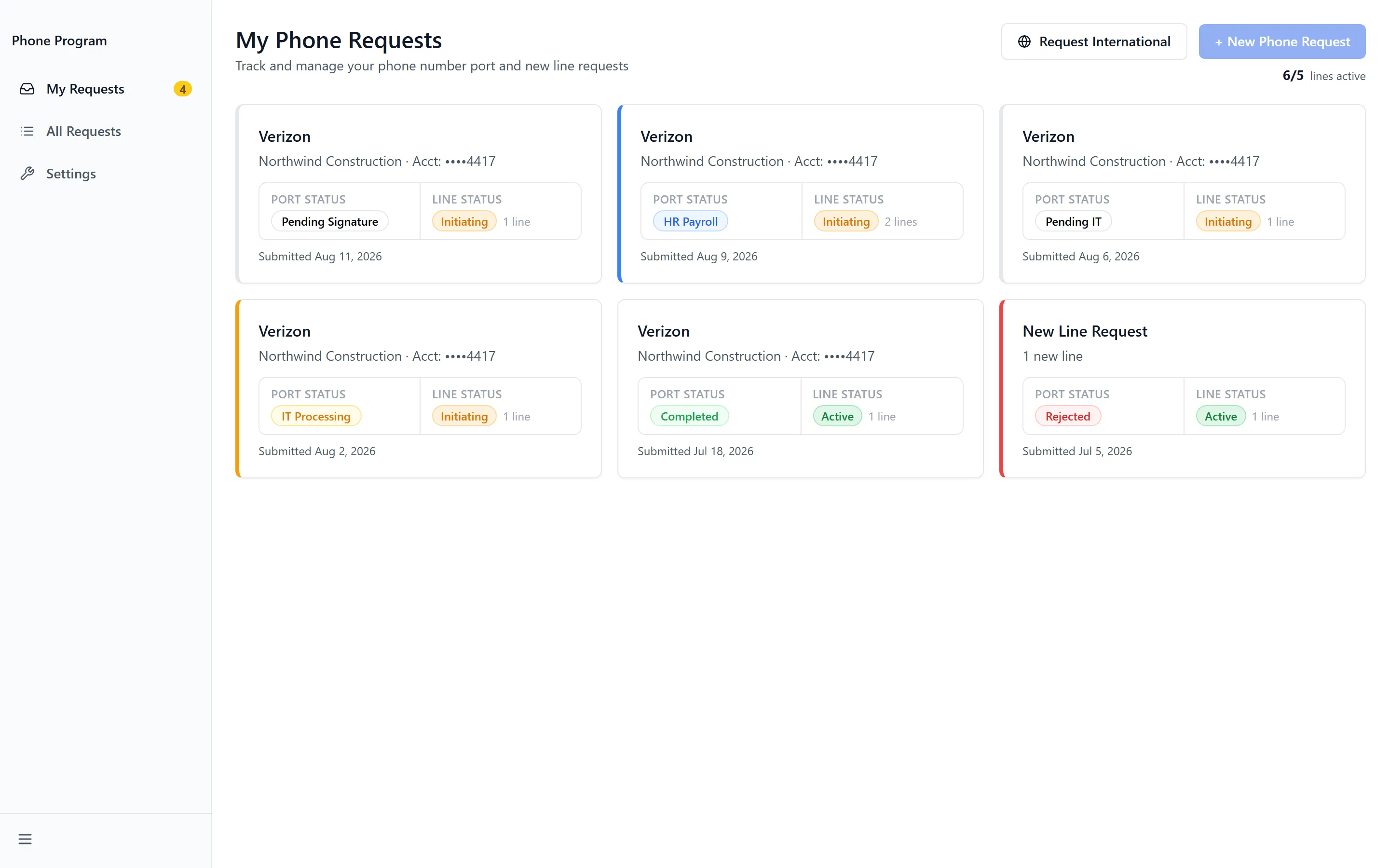
Counts across the top summarise where things stand: Total, Pending, Processing, Awaiting Sig, Completed and Rejected. Awaiting Sig is the one to watch — it means the request is waiting on you.
How a Request Moves
Section titled “How a Request Moves”A request passes through named stages, and the current one is shown on the request itself:
- Submitted — received
- HR Approved — approved by HR
- IT Approved, then IT Processing and IT Complete
- Signature — waiting for you to sign
- HR Payroll — passed to payroll
A number being moved adds Port Initiated and Port Completed, or Port-Out Complete when it is leaving. A request that does not proceed reads “This request was rejected.” or “This request was cancelled.”
Requesting a New Phone
Section titled “Requesting a New Phone”New Phone Request starts one. Where you are bringing an existing number with you, the form also collects your current Carrier Info:
- Carrier — who the number is with now
- Account Holder and the account number
- Billing Zip — the billing postcode on that account
- Device Status — whether the handset is paid off
Validation is specific about what is missing — “Account holder name is required.”, “Billing zip code must be exactly 5 digits.” and “Current carrier is required.” among them.
Finding your IMEI and PIN
Section titled “Finding your IMEI and PIN”Two pieces of information trip people up, and the app has help for both. Finding Your IMEI explains how to get the handset identifier on Android and iPhone. Account PIN / Port-Out PIN covers how to obtain the transfer PIN from each major carrier, with the phone number or app to use — Boost Mobile, Cricket Wireless and Consumer Cellular among them, each with its Customer Service route and whether App / Website Chat works.
Where more than one line is involved, Copy this PIN to all other lines saves re-entering the same value.
Signing a Request
Section titled “Signing a Request”A request reaching Signature needs your authorization before it can go to payroll. Payroll Deduction Authorization opens with acknowledgement boxes and a signature field — Type your full legal name to sign.
Where a port is involved you may also see Port-In Authorization or Port-Out Authorization, which authorize moving the number rather than the payroll deduction.
International Plans
Section titled “International Plans”International Plan Request covers travel. Choose the lines involved, then set Departure Date and Return Date.
Two plan shapes are offered:
- International Day Rate — charged per day travelled
- International Monthly Package — a set monthly amount
Choose when the cost comes out of pay: Next Paycheck or Paycheck Following Travel. Signing works as it does elsewhere — Type your full legal name to sign, with both acknowledgements ticked, or you’ll see “Check both acknowledgment boxes before signing.”
The request then moves to International Plan Approved and International Plan Complete. Validation catches the common mistakes: “Return date must be on or after departure date.” and “Select at least one phone number.”
Cancelling an international plan
Section titled “Cancelling an international plan”Travel that falls through can be undone. Cancel International Plan asks you to Type Your Full Name to Authorize Cancellation, and the request then shows International Request Cancelled.
Porting a Number Out
Section titled “Porting a Number Out”Request Port Out moves a company number to a personal account — when you leave, or when a line stops being a company one. Choose the lines, or you will see “Select at least one line to port out.”
It needs Port-Out Authorization, and the request finishes at Port-Out Complete. Cancel Port Request stops one already in flight.
Troubleshooting
Section titled “Troubleshooting”Phone Program is missing, or I get “Access Denied”
Section titled “Phone Program is missing, or I get “Access Denied””Solutions: three things have to be true. Check them in order.
- An administrator has enabled Employee Phone Program in the App Store.
- Your group has been granted access to it.
- You have signed out and back in since that change. See Getting Access to Apps and Extensions.
My signature is rejected
Section titled “My signature is rejected”Solutions:
- Type your name exactly as HR holds it — the dialog shows the name it expects. A middle initial or a shortened first name is enough to fail the check.
- Tick both acknowledgement boxes. Signing is blocked until both are checked.
- If it still fails you’ll see “Signature submission failed. Please try again.” — that is a submission problem, not a name mismatch.
My request has said Awaiting Sig for days
Section titled “My request has said Awaiting Sig for days”Solutions:
- It is waiting on you, not on anyone else. Open it from My Requests and complete the authorization.
- Where several are outstanding, each one needs signing separately — the count under Awaiting Sig tells you how many.
My number transfer isn’t completing
Section titled “My number transfer isn’t completing”Solutions:
- Check the handset is unlocked and paid off. A carrier will not release a number on a device still under contract.
- Check the transfer PIN is current. Carriers expire them, so one obtained weeks ago may no longer work — Account PIN / Port-Out PIN lists how to get a fresh one.
- Check the Account Holder and Billing Zip match the carrier’s records exactly. A mismatch is the most common silent rejection.
I can’t submit an international request
Section titled “I can’t submit an international request”Solutions:
- Check the dates. “Return date must be on or after departure date.”
- Select at least one line — “Select at least one phone number.”
Related Articles
Section titled “Related Articles”- Administering the Employee Phone Program — Approvals, notifications and program settings
- Getting Access to Apps and Extensions — Start here if the app is missing or you see “Access Denied”
- Submit a Support Ticket — For anything this app cannot resolve