
Quantity or Lump Sum: How a Product Is Priced
Every product on a quote is priced one of three ways: per unit, as a lump sum, or hourly with a not-to-exceed cap. This article explains what each means, where a product’s way comes from, and how to change it on a quote.
The Three Ways
Section titled “The Three Ways”| On the quote | The price means | Subtotal | On the customer’s paper |
|---|---|---|---|
| per unit | The price of one unit | Price × quantity | Price, quantity and subtotal |
| lump sum | The whole amount | The price | Price and quantity blank; the amount under Subtotal |
| hourly, NTE | Billed hourly, up to a cap: the price is the cap | The cap | “Hourly, not to exceed” and the cap |
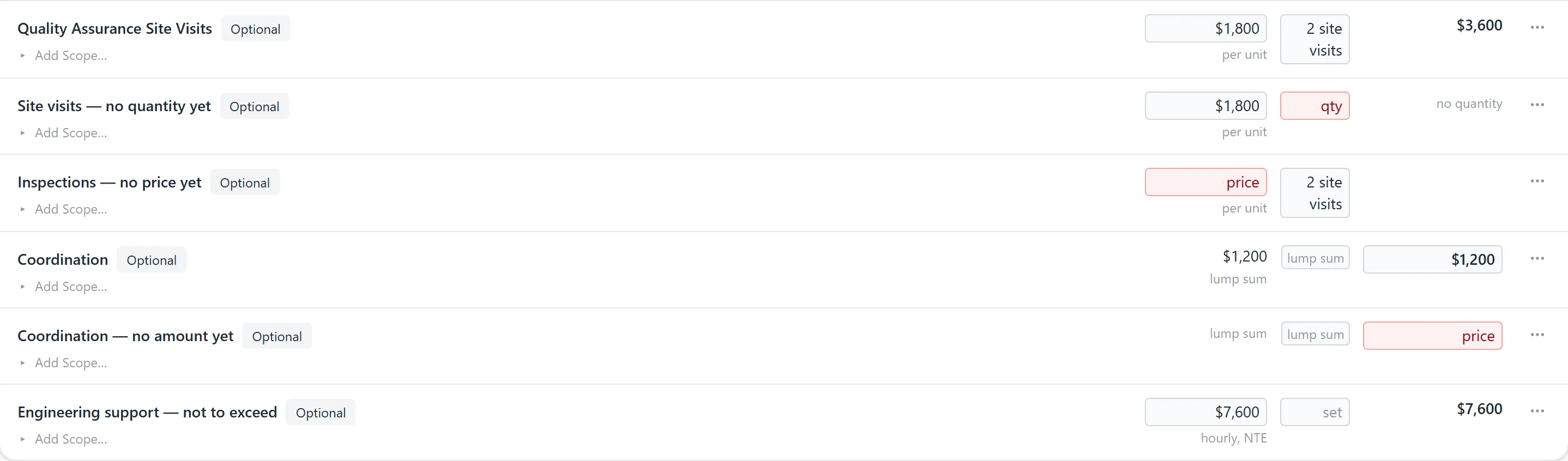
A red box is a value the row still needs. A quote with any row still waiting for its quantity, or with no way chosen, has no total until someone answers.
Where It Comes From
Section titled “Where It Comes From”Nothing guesses it. When a product lands on a quote, it takes the first of these that has an answer:
- Its Standard fee. An admin sets it under Admin → Products, on the product’s page: the fee and one of per unit, lump sum or per hour. The way is saved with the fee; a fee cannot be saved without one.
- The worksheet. When Quote Generator builds the quote from an opportunity, a product with no fee but a role and hours is priced as hours × the role’s rate, and says from the worksheet. It is per unit when the product was counted, and a lump sum when it was not.
- Nobody. The row waits and names itself, and the quote has no total until someone chooses.
When Quote Generator builds a quote from an opportunity and a per-unit product has no count, it starts at 1. A quote built from a NetSuite project template takes the way from the product’s Standard fee too, with the template’s count when it gives one.
Changing It on a Quote
Section titled “Changing It on a Quote”- The word under a product’s price is its current way. Click it to switch between per unit and lump sum. The amount stays; what it means changes, so the Subtotal moves.
- Type a quantity and the row is per unit, with that count. Switching to per unit leaves the row waiting for one.
- Clearing the quantity does not make a lump sum. The row waits, showing qty in red, and the quote has no total.
- A quantity must be more than zero: “to price this as a single amount, choose lump sum instead”.
- Switching to lump sum removes the quantity and its minimum.
The Minimum at Signing
Section titled “The Minimum at Signing”On a per-unit row the customer can choose how many at signing. Click the row to open its worksheet:

- Minimum at signing: the least the customer may take, a whole number of 1 or more, and never above the row’s quantity. The paper prints it under the price, for example “minimum 3 site visits”.
- Customer counts in: what one unit is called to the customer, such as site visits. your default means it came from your fee standards.
On the link, the customer can change the count up or down, but not below the minimum. There is no maximum.
Ask GrndCtrl
Section titled “Ask GrndCtrl”GrndCtrl chat reads the Help Center. Ask it, for example, how quantity or lump sum is decided, and it answers from this article and can show its screenshots.
Troubleshooting
Section titled “Troubleshooting”The quote has no total
Section titled “The quote has no total”A product is still waiting for its quantity, or has no way chosen. Find the row with the red box, then type a quantity or choose lump sum.
A quantity is refused
Section titled “A quantity is refused”It is below the row’s minimum at signing: “lower the minimum on the worksheet first”.
The minimum is refused
Section titled “The minimum is refused”The row needs to be per unit with a quantity: “set the quantity first”. A minimum above the quantity is refused too, because the quantity is the customer’s default count.