
How a Quote Gets Built
Between uploading a set of documents and the quote opening, three different hands work on it: you, a mechanical extraction, and the model. This article is for the administrator who has to be able to say which hand did what, and it is the ground every other tuning article stands on.
Seeing It in the App
Section titled “Seeing It in the App”The same flow is drawn inside Quote Generator. Open a quote with New quote and look beside Documents, or open Admin → Operations → Prompt Management and look at the top right of the Model binding card. Either one opens How does this work?, which shows the nine steps below and your tenant’s own confidence setting.
The Three Hands
Section titled “The Three Hands”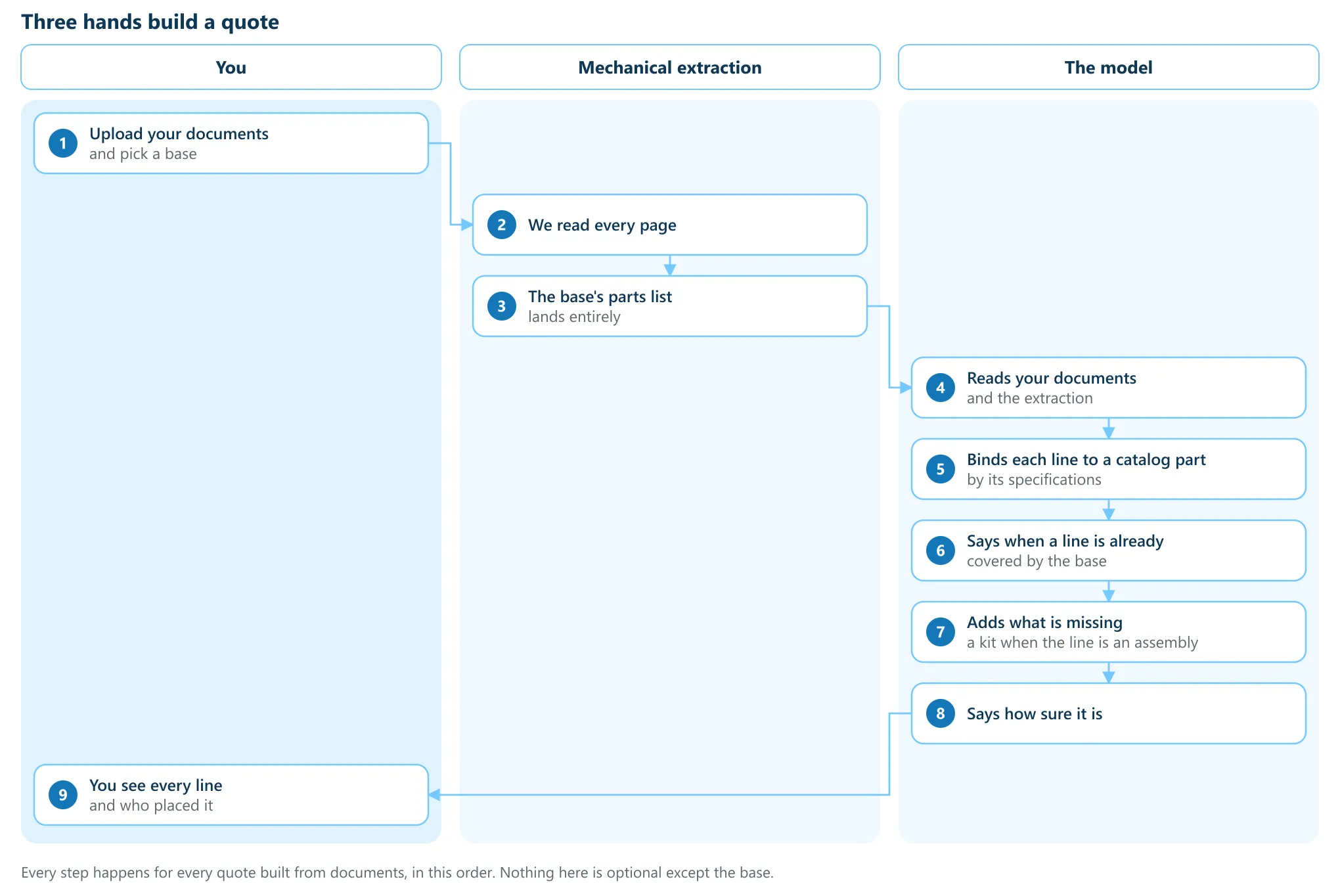
Every quote built from documents runs all nine steps in this order. Nothing in the sequence is skipped, and the only optional part is the base.
What you do
Section titled “What you do”- Upload the documents and, if you have one, pick a base. An RFQ, a spec sheet, a P&ID, an email with its attachments. The base is the standard design you already know the package is quoting.
- When the build has finished, read the quote: every unit, every line, and who placed each one.
What the mechanical extraction does
Section titled “What the mechanical extraction does”This half is machinery, not judgement. It reads each document page by page and turns it into units, the things being quoted, and their lines, kept in the document’s own words. Then it lands the base’s parts list: every part on the base you picked goes onto each unit it fits.
A base only adds. Nothing that comes from it is dropped, and nothing it brings is a guess.
What the model does
Section titled “What the model does”The model sees both the documents and what the extraction pulled out of them, and works through the lines one at a time. For each line it does four things.
- Binds it to a catalog part by its specifications: size, class, material, type. Where the line names no size or class, it takes the unit’s and records that it did.
- Says when the line is already covered by the base, so nothing is added twice. A disagreement about size or quantity is listed for you to settle rather than resolved quietly.
- Adds what the base does not cover. Where the line is an assembly it adds a kit from your kit library, and the kit’s pieces come with it.
- Says how sure it is, on every line it bound.
A line the model could not bind is not thrown away. It stays on the quote at $0 with its reasoning, and the reasoning names what was searched. Every line the model places also records that the model decided it, so the record can tell a drafted line from one a person kept.
What Confidence Means
Section titled “What Confidence Means”Confidence is the model’s belief that “this specific catalog row is the part the document asked for”. It is not a score for the line, the unit or the quote, and a line the model declined carries no confidence at all, because there is no row to be confident about.
Your tenant sets the bar. A bind under it is marked “worth a closer look” and nothing
else happens: it is still bound, still priced from your catalog, still on the quote. The
bar is a flag, never a filter. It ships at 0.7 and is the Confidence flag
threshold on Admin → Operations → Prompt Management.
Why the Split Matters
Section titled “Why the Split Matters”Knowing which hand placed a line tells you which lever to reach for when it is wrong.
| What looks wrong | Whose work it is | Where to go |
|---|---|---|
| A part the document asked for is not on the quote | The extraction, or the model | Reading the AI Record |
| The wrong catalog part was chosen | The model, working from your catalog | Tuning Quote Generator |
| A unit arrived bare, with no parts list | The base did not match well enough to load | The Preset seeding floor, in the tuning article |
| Lines are right but the price is not | Neither. Pricing is your configuration | Admin → Pricing |
Troubleshooting
Section titled “Troubleshooting”The quote will not open
Section titled “The quote will not open”A quote stays closed until every stage has finished, and the page you land on is the record of what it is doing. See Watching a Quote Build.
I picked no base and the units came in bare
Section titled “I picked no base and the units came in bare”That is the expected result. Without a base there is no parts list to land, so the model drafts one from the documents. The units arrive with their extracted specifications either way.
A line sits at $0
Section titled “A line sits at $0”The model could not bind it to a catalog part. Open the line’s reasoning: it names what was searched and what the catalog does not hold. That is a catalog gap to fill, not a failure to retry.